
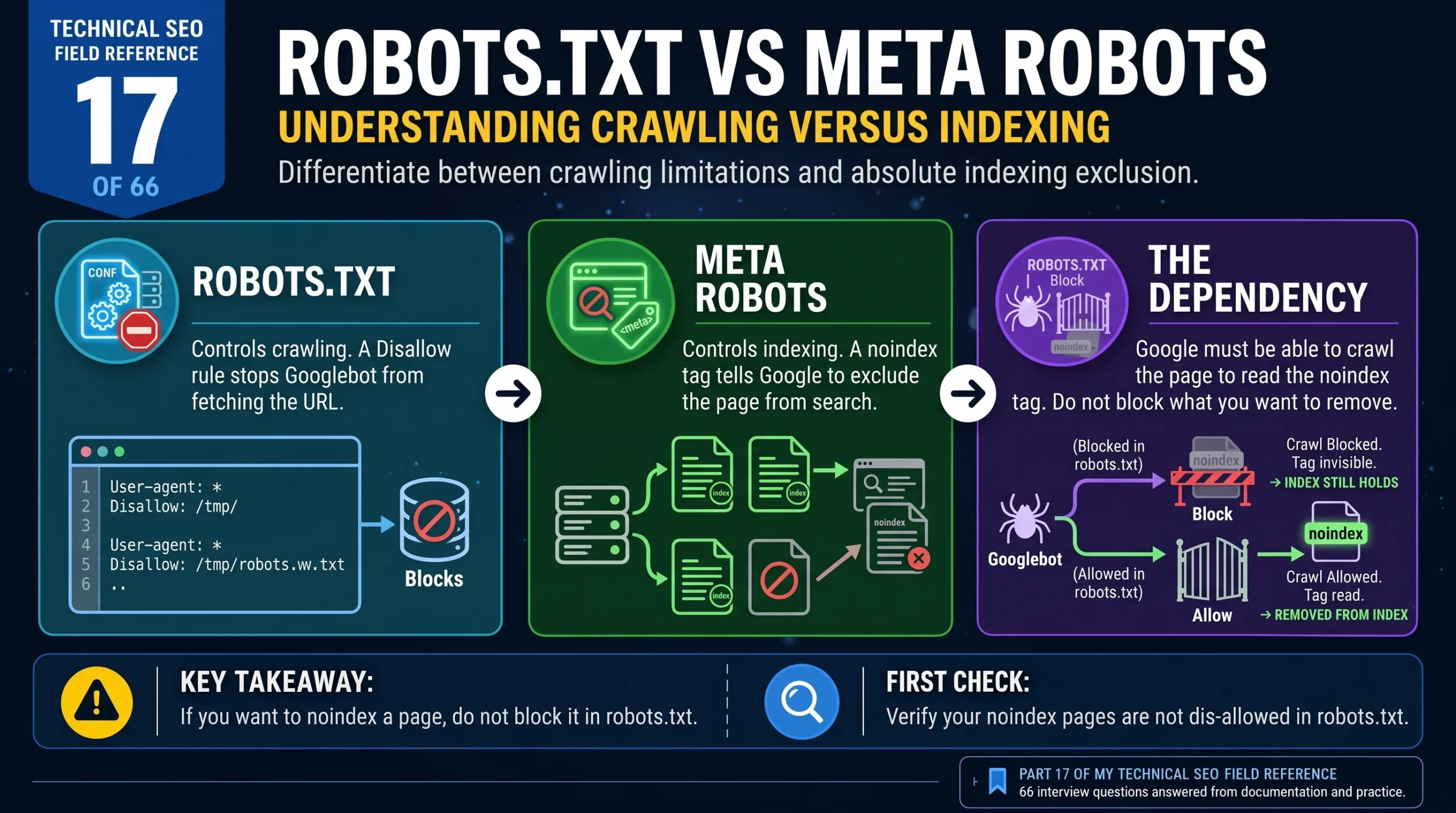
Technical SEO Field Reference, Question 17 of 66. The robots.txt vs meta robots question, checked against what Google currently documents.
Robots.txt tells Googlebot which URLs it can crawl. A meta robots noindex tag tells Google to exclude a page from search once it has fetched the page and read the instruction. Blocking a URL in robots.txt does not guarantee that it stays out of the index. If the URL is blocked, Google cannot fetch its current noindex tag, so that tag cannot do the job you intended. The robots.txt vs meta robots distinction starts with what you are trying to stop.
You have added a Disallow rule. The page has a noindex tag too. Weeks later, its URL is still in Google.
That can look like Google ignoring your settings. But if the crawl is blocked, Google has not been able to read the instruction inside the page. The two settings are working against the outcome you want.
Start with what you are trying to stop: Google fetching the page, or Google showing it in search.
Why the robots.txt vs meta robots distinction matters
Crawling is Google fetching a page. Indexing is processing the available information and deciding whether to include it in the search index. Question 11 covers crawling, indexing and ranking in more detail.
Robots.txt applies before the fetch. A matching Disallow rule tells a crawler that follows those rules not to request the URL.
A meta robots tag sits inside the page’s HTML head. Google has to fetch the page to read it. The noindex instruction tells Google that the page should be excluded from search.
You can also deliver noindex through an X-Robots-Tag HTTP response header. That is a separate delivery method, useful for resources such as PDFs that do not have an HTML head. The header can be used on HTML pages too.
So the instruction’s location is part of the robots.txt vs meta robots problem. A noindex tag can be present in your CMS and still be unreadable to Google because robots.txt prevents the fetch.
What Google says about robots.txt vs meta robots
Google’s robots.txt documentation explains that a blocked URL can still appear in search if Google discovers it through links. A crawl block does not guarantee exclusion.
Its noindex guidance makes the dependency clear: Google needs access to the resource to read the tag or header. Removal follows when Google processes that instruction, so there is no fixed recrawl deadline.
For an HTML page, the tag goes in the head:
<meta name="robots" content="noindex">For a response header:
X-Robots-Tag: noindexNeither method works if Google cannot fetch the response containing it.
Google stopped supporting the unofficial noindex: rule in robots.txt on 1 September 2019. If you find those lines in an old file, do not rely on them. Use a supported meta tag or HTTP header instead.
If the content is private, require authentication. Robots.txt and meta robots are crawler instructions, not access controls.
The interview answer for robots.txt vs meta robots
Robots.txt controls crawling. Meta robots includes indexing instructions such as noindex, which Google can only read after fetching the page.
If I wanted to prevent crawling, I would use a robots.txt Disallow rule. If I wanted a page removed from search, I would make its noindex accessible to Googlebot. For a PDF or another non-HTML resource, I would use an X-Robots-Tag header.
I would check that robots.txt was not blocking the removal instruction, then monitor whether Google had fetched and processed it. I would not promise removal on a particular date.
That last point is easy to overlook. Adding the tag changes the page immediately. Google still needs to revisit it.
An example of a blocked noindex in the robots.txt vs meta robots conflict
Consider a site with old filtered listings and legacy pages it wants removed from search.
The pages have noindex tags, but their paths are also blocked in robots.txt. Some URLs remain in the results, perhaps without descriptions.
The visible result is that the URLs still appear. A missing snippet alone does not prove why. To diagnose it, check the robots.txt rules, inspect the affected URLs in Search Console and look at crawl activity in the logs.
If those checks confirm that Googlebot cannot fetch the pages, it cannot read their current noindex tags either. Discovery through links can explain why Google still knows about the URLs.
The fix is to allow Googlebot to fetch the pages while keeping noindex in place. Confirm that the tag is delivered in the HTML or response header, then monitor processing.
It may feel odd to restore crawling when you want a page gone from search. But the fetch is how Google receives the removal instruction.
Question 9 covers the specific case of a URL that is both blocked and noindexed yet still appears in Google.
Robots.txt vs meta robots: crawling versus indexing, stage by stage
The following table summarises how each control works and what to verify.
For removal through noindex, keep the instruction accessible. Do not add a crawl block that prevents Google from reading it.
For crawl prevention, use robots.txt while recognising its limit: a blocked URL discovered through links can still appear in search.
Once you have changed the implementation, check what Google has processed. Seeing a tag in your browser does not establish that Googlebot has revisited the page.
What changes for AI crawlers in the robots.txt vs meta robots picture
I would be careful about treating “AI crawlers” as one group. Search crawlers, training crawlers and user-triggered fetchers can have different purposes and rules.
For example, OpenAI’s crawler documentation separates OAI-SearchBot from GPTBot. The first serves search; the second concerns content that may be used for model training. Their robots.txt settings are independent.
OpenAI also says that robots.txt rules may not apply to user-initiated ChatGPT-User visits. That is a reason to check the named agent before assuming a crawl rule controls every request from a service. For a deeper look at these distinctions, see the robots.txt AI crawler configuration reference.
A Google noindex rule should not be presented as a universal opt-out from AI access or training. Check the provider’s documented controls for the purpose you want to restrict, then use verified server logs to inspect what actually fetched the page.
The interview trap on robots.txt vs meta robots
“I would Disallow it to remove it from Google” applies a crawl control and expects an indexing outcome.
Explain which outcome you want and how Google will receive the relevant instruction. If the goal is removal through noindex, a Disallow can prevent the very fetch needed to process it.
The AI version of the mistake is assuming that all agents follow the same rules. Name the crawler and its purpose before recommending a setting.
Takeaway
For a page that still appears despite noindex, check access first. Can Googlebot fetch the response containing the instruction, and has it done so since the change?
A tag Google has not read cannot remove the page from search.
Have questions about this topic? Contact The GEO Lab · Return to homepage