
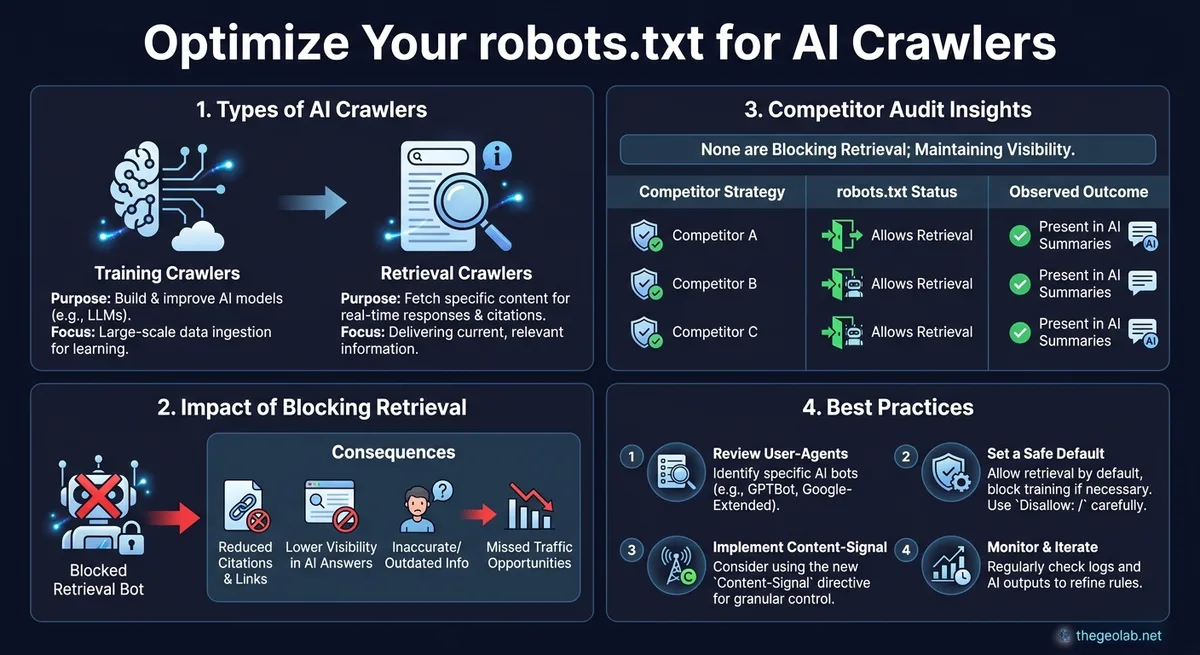
AI crawlers split into two jobs: training crawlers (collect content to train models) and retrieval crawlers (fetch pages in real time to answer live queries and produce citations). Blocking a training crawler has no effect on live citations. Blocking a retrieval crawler removes you from citation eligibility on that platform. A GEO Lab competitor audit found none of the audited competitors blocking any AI crawler. The safe default: allow retrieval crawlers for citation eligibility, decide on training crawlers separately, and review user-agent strings every few months because the crawler landscape changes.
The two jobs AI crawlers do
We audited the robots.txt files of several GEO competitors. None of them was blocking any AI crawler. That single finding reframes the whole question: for most sites, competitive visibility in AI search is content-driven, not infrastructure-driven, and the robots.txt decision is about control rather than about unlocking citations. This reference covers how to configure robots.txt for AI crawlers, what each directive does, and the tradeoffs of allowing or blocking.
AI crawlers split broadly into two purposes, and conflating them is the most common configuration mistake. Training crawlers collect content to train models. Retrieval or user-facing crawlers fetch pages in real time to answer a live query and are the ones that can produce a citation. Blocking a training crawler has no effect on whether you get cited in live AI search. Blocking a retrieval crawler removes you from citation eligibility on that platform entirely. They are different decisions with different consequences.
| Crawler type | Purpose | Effect of blocking | Examples (verified June 2026) |
|---|---|---|---|
| Retrieval / user-facing | Fetches pages in real time to answer live queries | Removes page from citation eligibility on that platform | GPTBot, OAI-SearchBot, ChatGPT-User, PerplexityBot, ClaudeBot, Claude-User |
| Training | Collects content to train or fine-tune models | No effect on live citations | Google-Extended, CCBot, Bytespider, cohere-training-data-crawler |
The named directory of which user-agent does which job is maintained separately in the AI crawler user-agent directory. The key point for configuration is that you should decide per purpose, not block everything labelled AI by reflex. Each platform has its own crawl and retrieval behaviour, which is why platform-specific GEO treats them separately.
Going deeper? The GEO Experiments ebook covers how to design and measure AI citation tests — including the crawler access that makes measurement possible.
How robots.txt directives work for AI crawlers
robots.txt uses user-agent blocks followed by allow and disallow rules. Each AI crawler declares a user-agent string, and you target it with a matching block. A disallow rule on a retrieval crawler tells that platform not to fetch the listed paths, which removes those paths from citation candidacy on that platform. An allow rule, or simply not disallowing, leaves the paths fetchable. Rules are per user-agent, so you can permit one crawler and block another.
A worked structure looks like a block per crawler. You set a block for each named AI user-agent, then a default block for everything else. Order and specificity follow standard robots.txt precedence, where the most specific matching user-agent block applies. Because the user-agent strings change as platforms launch and rename crawlers, the file needs periodic review rather than being set once and forgotten.
The Content-Signal direction
Beyond allow and disallow, there is movement toward expressing intent rather than just access. A content-signal style directive, such as those proposed by contentsignals.org, aims to let a site say how its content may be used, for example permitting retrieval for live answers while declining training use, rather than the binary of fully blocking or fully allowing a crawler. Support for this is uneven across platforms and still developing, so treat it as a forward-positioning option rather than a guaranteed control. Where a platform honours it, it lets you separate the two crawler jobs cleanly instead of making one allow-or-block decision that covers both.
The allow-versus-block tradeoff
Allowing retrieval crawlers is the default position for any site that wants AI citations, because blocking them forfeits citation eligibility on that platform. The case for blocking is narrower: protecting content from training use, managing crawl load, or a deliberate choice to stay out of AI surfaces. The competitor audit finding matters here. Since none of the audited GEO competitors blocked AI crawlers, blocking does not give an opponent a visibility gap to exploit, and it does not by itself lift your own citations. The lever for citation is content and retrieval rank — what AI search optimisation actually covers — not crawler permission, provided you have not blocked the retrieval crawler that makes citation possible in the first place.
A safe default configuration
For most sites seeking AI visibility, the safe default is to allow retrieval crawlers across the content you want cited, make a deliberate decision on training crawlers based on how you feel about training use, and keep a default block only for paths you would never want fetched such as admin or staging areas. Review the user-agent strings every few months, because the crawler landscape changes and a block written against an old string silently stops applying. Verify your live robots.txt against the current crawler list rather than assuming an older file still does what you intended. The WordPress technical setup guide covers this verification step alongside other infrastructure checks.
- Training crawlers and retrieval crawlers are different decisions. Blocking a training crawler has no effect on live citations. Blocking a retrieval crawler forfeits citation eligibility on that platform.
- Competitors are not blocking. A GEO Lab audit found none of the audited GEO competitors blocking any AI crawler. Permission is table stakes, not an advantage.
- Content-Signal directives are emerging. They let you express intent (permit retrieval, decline training) rather than making a binary allow-or-block decision. Support is uneven.
- Review every few months. User-agent strings change. A block written against an outdated string silently stops applying. Verify against the live crawler list.
Want to measure citation rate per platform? The 30-check citation protocol walks through per-platform measurement alongside crawler verification.
Questions? Contact The GEO Lab.
Frequently asked questions
Should I block AI crawlers in robots.txt?
Only deliberately. Blocking a retrieval crawler removes you from citation eligibility on that platform, while blocking a training crawler does not affect live citations. For most sites seeking AI visibility, allow retrieval crawlers and decide on training crawlers separately based on how you feel about training use.
Does blocking AI crawlers hurt my citations?
Blocking retrieval or user-facing crawlers does, because those are the crawlers that fetch pages to answer live queries and produce citations. Blocking training crawlers does not affect live citation, since training collection is a separate job from real-time retrieval.
Will allowing AI crawlers increase my citation rate?
Allowing them is necessary but not sufficient. A GEO Lab competitor audit found none of the audited competitors blocked AI crawlers, so permission is table stakes rather than an advantage. Citation rate is driven by content and retrieval probability once the retrieval crawler is allowed to fetch the page.
How often should I review robots.txt for AI crawlers?
Every few months. AI crawler user-agent strings change as platforms launch and rename crawlers, and a rule written against an outdated string silently stops applying. Verify your live file against the current crawler list rather than assuming an older configuration still behaves as intended.
What is the difference between a training crawler and a retrieval crawler?
A training crawler collects content to train or fine-tune AI models. A retrieval crawler fetches pages in real time to answer a live user query and can produce a citation. The two have different user-agent strings and different consequences when blocked. Examples of retrieval crawlers: GPTBot, PerplexityBot, ClaudeBot. Examples of training crawlers: Google-Extended, CCBot, Bytespider.