
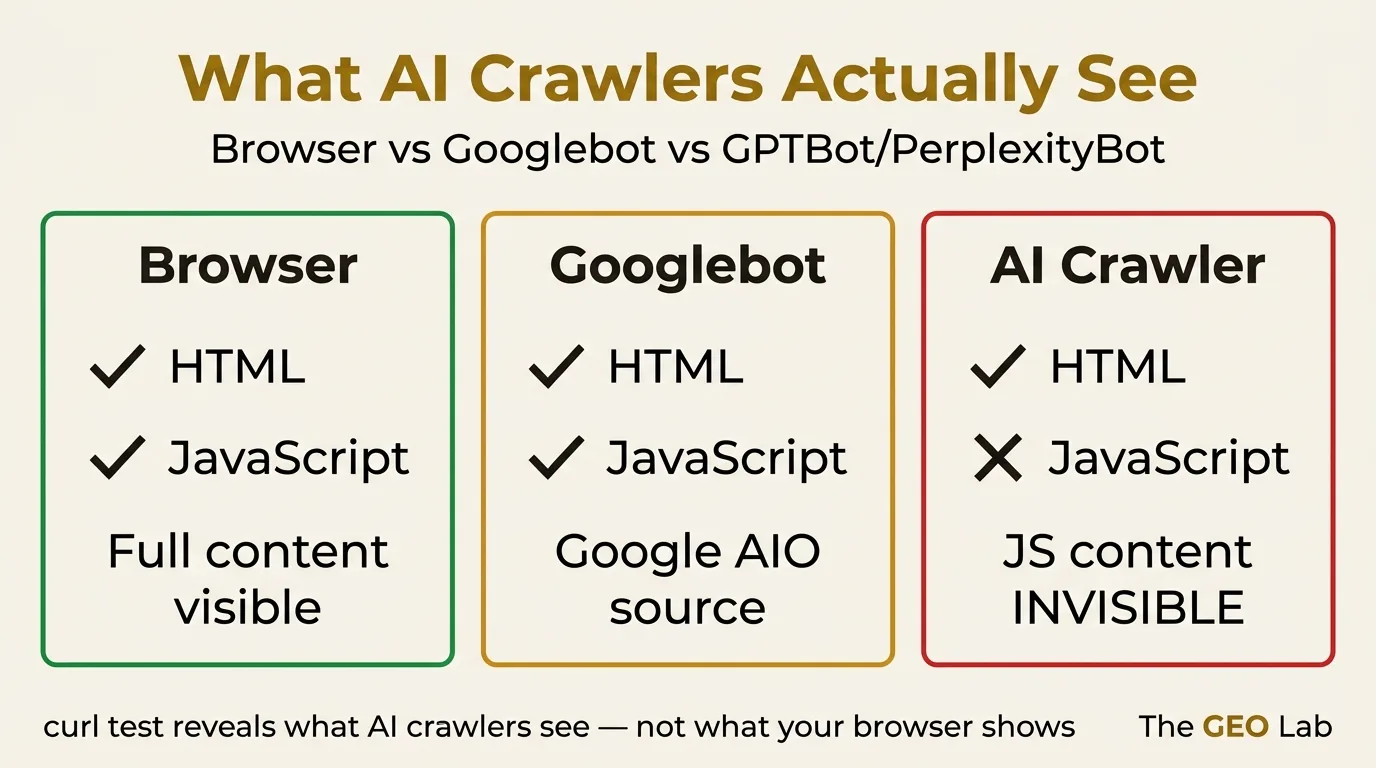
AI crawlers don’t execute JavaScript. If your GEO-critical content renders via JS, it is invisible to GPTBot, PerplexityBot, and ClaudeBot — regardless of what your browser shows you.
TL;DR
AI crawlers are HTML-only bots. GPTBot, PerplexityBot, and ClaudeBot fetch raw HTML and stop there — no JavaScript execution, no dynamic rendering. Any content that your browser shows but your HTML source does not contain is invisible to every AI platform that could cite it.
The GEO Lab Brand Citation Index leaderboard was one of those invisible pages. A single-line curl test revealed it. A static HTML pre-render fixed it. This post documents both.
The Problem Nobody Checks For
I spent a week building the GEO Brand Citation Index leaderboard. The table was clean, the data was current, the schema was correct. I ran the usual browser checks — everything rendered perfectly.
Then I ran curl.
The raw HTML returned zero table rows. The entire leaderboard — every brand, every citation rate, every ranking — existed only in JavaScript memory. GPTBot had been visiting the page. It had been retrieving an empty table.
This is the most common GEO mistake nobody talks about, because the problem is invisible in all the tools people actually use. Your browser renders JavaScript. Google Search Console renders JavaScript for Googlebot. Your page speed tool renders JavaScript. But GPTBot, PerplexityBot, and ClaudeBot do not render JavaScript — and none of those tools test what those crawlers actually see.
As of May 2026, AI crawlers are HTML-only — a point Search Engine Land has also documented in their GEO coverage. That is not a temporary limitation pending an update. It is an architectural decision. AI platforms retrieve content for knowledge extraction and citation, not for rendering interactive experiences. They have no need for a JavaScript engine, and they do not have one.
AI Crawler vs Googlebot vs Browser: Three Different Things
Most SEOs have a mental model built around Googlebot. As SparkToro’s zero-click research demonstrates, search architecture determines visibility — and AI crawler architecture is fundamentally different. That model is wrong for AI crawlers, and applying it is what causes the JS rendering blind spot.
| Crawler type | Examples | Executes JS? | Sees dynamic content? | Relevant for GEO? |
|---|---|---|---|---|
| Browser | Chrome, Safari, Firefox | Yes | Yes | Not a crawler |
| Full-render crawler | Googlebot (2019+), Bingbot | Yes | Yes | Partial — Google AIO only |
| HTML-only crawler | GPTBot, PerplexityBot, ClaudeBot, AhrefsBot, most backlink crawlers | No | No | Yes — primary GEO crawlers |
Crawler tiers as of May 2026. AI platform crawlers sit in the HTML-only tier — the same tier as most link analysis and technical SEO crawlers.
Googlebot’s JavaScript rendering is both its advantage and the reason it creates false confidence. When you verify that Googlebot can see your content, you are confirming something about a crawler that operates very differently from GPTBot. The fact that Google Search Console’s URL Inspection tool shows your JS-rendered content is correct — for Google. It tells you nothing about what Perplexity or ChatGPT can see.
Google AIO is a partial exception. Google’s AI Overviews draw from Googlebot’s crawl, which does render JavaScript. This means JS-rendered content can, in principle, appear in Google AIO. But Perplexity, ChatGPT, and Claude are on their own crawl infrastructure — HTML-only — and those platforms account for the majority of AI citation traffic that bypasses Google entirely.
For GEO purposes, the correct mental model is: if it is not in the raw HTML, it does not exist for the platforms that matter most.
The GEO Lab AI Crawler Visibility Test: Rendering Parity Check
Testing for the JS rendering problem requires exactly one command. No tools, no plugins, no crawl budget. Just curl.
The test
curl -s https://yourdomain.com/your-page/ | grep -c '<tr>'Replace <tr> with whatever element you expect to be present — a table row, a heading, a specific class, a data attribute. If your browser shows 25 table rows and this command returns 0, those rows are JavaScript-rendered and invisible to AI crawlers.
You can make the test more specific. To check for a particular piece of text:
Text content check
curl -s https://yourdomain.com/your-page/ | grep -c 'your expected content'To get the full raw HTML for manual inspection:
Full source dump
curl -s https://yourdomain.com/your-page/ | grep -A5 'class="your-component"'Run this test on every page that contains content you want AI platforms to cite. The pages most at risk are those with dynamic data tables, React or Vue components, shortcode-rendered widgets, JavaScript-driven carousels or tabs, and any content that loads after the initial HTML response via AJAX or fetch calls.
What We Found on the GEO Lab Leaderboard
The Brand Citation Index leaderboard was built as a React component inside a WordPress shortcode. It pulled citation rate data from a JSON endpoint, rendered it into a sortable table, and applied colour-coded scoring. In the browser, it looked exactly as intended.
Before — what curl returned
<div id="citation-leaderboard"></div>
<script>
  fetch('/wp-json/geolab/v1/citations')
    .then(res => res.json())
    .then(data => renderTable(data));
</script>
The <div> was an empty container. The table existed only after the JavaScript fetch resolved and renderTable() executed. GPTBot, arriving at the page, would have retrieved the empty container and nothing else.
The server log confirmed GPTBot had been visiting regularly. The citation rate for the leaderboard page in the E002 experiment: 0%. The leaderboard — the page most directly relevant to citation rate queries — was producing no citations because it had no retrievable content.
The invisibility was total. Not degraded — absent. Every brand ranking, every citation score, every methodology note in the leaderboard table was unreachable by any AI crawler. The page existed in the index as a shell.
Running curl -s https://thegeolab.net/geo-brand-citation-index/ | grep -c '<tr>' returned 0. After the fix, the same command returned 28 — one row per brand in the table, all present in the raw HTML, all accessible to GPTBot, PerplexityBot, and ClaudeBot on their next crawl.
The Fix: Server-Side Pre-Render to Static HTML
The fix has one principle: GEO-critical content must be present in the raw HTML that the server returns. No exceptions. No “it renders fast enough that crawlers will wait.” Crawlers do not wait. They fetch, parse, and move on.
For the leaderboard, the fix was to generate the table server-side and write it directly into the WordPress post content as static HTML. The JavaScript component was removed. The PHP function that generated the same table data was called at page-generation time instead of at browser-load time, and its output was stored as HTML in the post content field.
Before — JS-rendered (invisible to AI crawlers)
<div id="citation-leaderboard"></div>
<script>fetch('/api/citations').then(renderTable)</script>
After — static HTML pre-render (visible to all crawlers)
<table class="leaderboard-table">
  <thead>
    <tr>
      <th>Brand</th>
      <th>Perplexity</th>
      <th>Google AIO</th>
      <th>ChatGPT</th>
      <th>Score</th>
    </tr>
  </thead>
  <tbody>
    <tr><td>Brand A</td><td>34%</td>...</tr>
    <!-- all rows in static HTML -->
  </tbody>
</table>
The update process for the leaderboard is now: generate the table HTML server-side via PHP, write the updated HTML to the post content field via WP-CLI, clear the FastCGI cache, verify with curl | grep -c '<tr>'. The leaderboard updates monthly; the static HTML is updated at the same time.
This pattern — generate server-side, store as static HTML, verify with curl — is the correct deployment workflow for any content that needs to be retrievable by AI crawlers.
The GEO Workbook: 30-Day AI Visibility Action Plan
Includes a full JS rendering audit checklist and the nine WordPress-specific traps documented below, with fix commands for each. Download free →
Nine WordPress JavaScript Traps for GEO
WordPress has specific patterns that produce JS-rendered content silently — without any obvious indication in the editor that the content will be invisible to crawlers. These are the nine most common as of May 2026.
| Trap | What it looks like | What AI crawlers see | Fix |
|---|---|---|---|
| React/Vue shortcodes | [citation_table] renders a full component | Empty div container | Replace with static HTML generated server-side |
| AJAX data loading | Table/chart populated via fetch() after page load | Empty container or loading skeleton | Inline the data in the initial HTML response |
| JavaScript tabs/accordions | Hidden content revealed on click | Only the first tab or nothing | Use CSS-only disclosure or include all content in HTML |
| Lazy-loaded content | Images/content load on scroll via Intersection Observer | Placeholder or empty element | Disable lazy loading for above-fold GEO-critical content |
| Gutenberg dynamic blocks | Block marked isDynamic: true renders server-side per request, but via PHP — not JS. May still be fine. |
Usually visible — verify with curl | Verify with curl. PHP server-side rendering is crawler-safe. |
| WooCommerce product data | Price, stock, reviews loaded via JS | Empty price containers | Use PHP template functions, not JS injection |
| Pagebuilder components | Elementor, Divi animations and dynamic content | Static version only, or nothing | Test each component individually with curl |
| Social proof widgets | Review feeds, follower counts loaded via third-party JS | Empty div | Screenshot or static fallback for GEO-critical social proof |
| Chart.js / D3 visualisations | Canvas or SVG generated entirely by JavaScript | Empty canvas element or no element | Provide a static data table alongside any JS chart |
WordPress JS rendering traps documented from GEO Lab site audits and deployment failures. May 2026.
The pattern across all nine traps is the same: the content exists in JavaScript memory after execution, not in the HTML that the server returns. The fix in every case is the same: move the content generation to happen before the server sends the response, not after the browser receives it.
The Three-Step JS Rendering Audit Protocol
Running the full JS rendering audit across a site takes under 30 minutes and requires no specialist tools beyond curl and access to your server logs.
-
Identify all GEO-critical pages
List every page on your site that contains content you actively want AI platforms to cite — data tables, research findings, framework definitions, unique statistics, leaderboards, methodology pages. These are the pages where JS rendering failures have the most impact. -
Run the curl test on each page
For each page, runcurl -s [URL] | grep -c '[key element]'and compare the count to what your browser shows. Any zero or near-zero count for content your browser renders indicates a JS rendering failure. Log each result. -
Cross-reference with AI crawler log data
Rungrep -i 'GPTBot|PerplexityBot|ClaudeBot' /var/log/nginx/access.log | awk '{print $7}' | sort | uniq -c | sort -rnto see which pages AI crawlers have visited and how often. Pages with regular crawler visits but JS rendering failures are your highest-priority fixes — the crawlers are already there, seeing nothing.
After the audit, prioritise fixes by: pages with existing AI crawler visits (the problem is active), pages containing unique data or proprietary findings (highest citation value if fixed), and pages with the most internal links (fixing them also improves the crawlable content pool around them).
Key Takeaway
AI crawlers are HTML-only. Content that exists only in JavaScript memory is invisible to GPTBot, PerplexityBot, and ClaudeBot — regardless of how it looks in the browser or what Google Search Console reports.
- Run
curl -s [URL] | grep -c '[element]'to test any page in under 10 seconds - The fix is server-side pre-rendering: generate HTML before the response, not after browser load
- Googlebot rendering JS is irrelevant for Perplexity and ChatGPT citations — different crawlers, different architecture
- Pages with regular AI crawler visits but JS-rendered content are the highest-priority fixes
Frequently Asked Questions
Do AI crawlers execute JavaScript?
No. As of May 2026, GPTBot (OpenAI), PerplexityBot, and ClaudeBot (Anthropic) are HTML-only crawlers. They fetch the raw HTML response from the server and stop there — no JavaScript execution, no dynamic rendering, no waiting for content to load. Any content that your page generates via JavaScript after the initial HTML response is invisible to these crawlers. This is different from Googlebot, which does execute JavaScript, but Googlebot’s JS rendering only benefits Google AI Overviews — not Perplexity, ChatGPT, or Claude citations.
How do I test if my content is visible to AI crawlers?
Run curl -s https://yourdomain.com/your-page/ | grep -c 'your content' from any terminal. Replace ‘your content’ with a text string or HTML element you expect to be present — for example, <tr> for table rows or a specific heading text. A result of 0 when your browser shows the content confirms it is JavaScript-rendered and invisible to AI crawlers. This test takes under 10 seconds per page.
What is server-side pre-rendering and why does it fix the problem?
Server-side pre-rendering means generating the HTML content before the server sends its response — using PHP, Python, or another server-side language — rather than generating it in the browser after JavaScript executes. The resulting HTML contains all the content in the initial response, so any crawler that fetches the page receives the full content regardless of whether it executes JavaScript. For WordPress, this means generating tables and dynamic content via PHP functions and storing the output as static HTML in the post content field, rather than using JavaScript components or shortcodes that execute at browser load time.
Does this affect Google AI Overviews?
Google AI Overviews draw from Googlebot’s crawl, and Googlebot does execute JavaScript. This means JS-rendered content can, in principle, appear in Google AI Overviews even without a static HTML fix. However, Perplexity, ChatGPT, and Claude all use their own HTML-only crawlers and are not affected by Googlebot’s JavaScript rendering capability. For any site targeting citations across multiple AI platforms — not just Google AIO — static HTML pre-rendering is required.
Which types of content are most at risk from JS rendering failures?
Data tables built with React or Vue components, content loaded via AJAX or fetch calls after page load, JavaScript-driven tabs and accordions where content is hidden by default, lazy-loaded content that only appears on scroll, shortcode-rendered widgets that execute JavaScript to populate their output, and any Chart.js or D3.js visualisations where the underlying data is not also present as an HTML table. For GEO specifically, leaderboards, citation rate tables, research data, and methodology pages are the highest-risk content types because they are also the pages with the highest citation value if made crawlable.
Check your own site right now. Run curl -s [your most important page] | wc -l and compare the line count to your browser’s view-source. A large gap indicates significant JS-rendered content. See the GEO Lab Brand Citation Index (thegeolab.net/geo-brand-citation-index/) — the page that this fix made crawlable.