
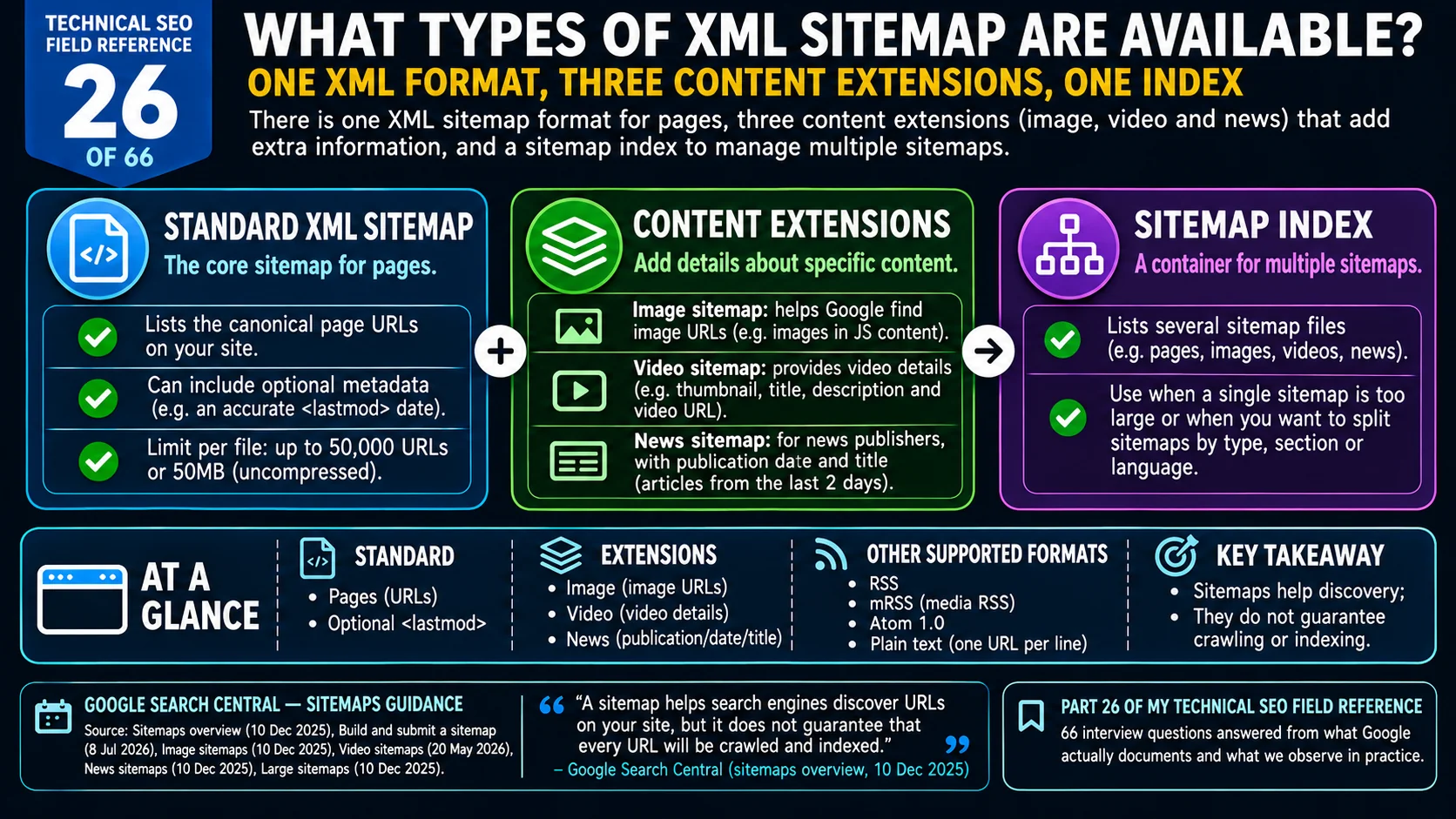
Technical SEO Field Reference, Question 26 of 66. The interview answer, checked against what Google currently documents.
There are three layers to the types of XML sitemap. The standard XML sitemap lists page URLs. Image, video and news sitemaps are extensions of it, each adding information about one kind of content. A sitemap index file does not describe content at all: it lists other sitemaps so you can submit many at once. Google also accepts RSS, mRSS, Atom and plain text sitemaps. Use the standard sitemap for pages, an extension only when that content type matters in search, and an index when a single file is too big or you want to track sitemaps separately.
An interviewer asks what types of XML sitemap are available. Most candidates list four names.
The better answer separates the formats from the extensions, and says when each one earns its place.
Why the types of XML sitemap matter
A sitemap is a hint about which URLs matter and what they are. The types differ in what they let you say.
A standard sitemap says “these pages exist”. An image or video extension says “this page contains this file”. A news extension says “this article was published at this time”. An index says “these are my sitemaps”.
Picking the wrong one is rarely harmful. The real failure is the opposite: building every type because they exist, and maintaining files nobody needs.
What Google says about the types of XML sitemap
Google’s sitemap overview (page last updated 10 December 2025) says a sitemap can carry information about specific types of content, including video, image and news. It also says a sitemap helps search engines discover URLs but does not guarantee that everything in it is crawled and indexed, and that a site of about 500 pages or fewer, well linked internally, may not need one.
The build and submit guide (page last updated 8 July 2026) compares the formats Google supports: XML sitemap, RSS, mRSS and Atom 1.0, and text sitemap. It says Google has no preference between them. It calls the XML sitemap the most versatile because it is extensible, and says it can carry extra data about images, video, news and localised versions of pages.
Each extension has its own page. The image sitemaps page (last updated 10 December 2025), the video sitemaps page (last updated 20 May 2026) and the news sitemaps page (last updated 10 December 2025) say each can be a separate sitemap or added to an existing one. The sitemap index guide (page last updated 10 December 2025) covers splitting and index files.
The interview answer for the types of XML sitemap
I would say there is one XML sitemap format with three content extensions, and an index file for managing several. The standard sitemap covers pages. Image sitemaps help Google find images it might not otherwise discover, such as ones loaded by JavaScript. Video sitemaps give Google details about videos on a page. News sitemaps are for news publishers. The index file is for sites that exceed the limits or want to track sitemaps individually.
Then I would say how I choose: start with the standard sitemap, add an extension only when that content matters in search, and add an index when size or tracking calls for it.
Types of XML sitemap at a glance
The standard XML sitemap
The standard sitemap is a urlset of URLs. Each can have a last modified date. Google says it ignores the priority and changefreq values, and uses lastmod if it is consistently and verifiably accurate, for example by comparing it to the page’s last real change.
Google’s limits apply to every format: 50MB uncompressed or 50,000 URLs per sitemap. Use absolute URLs, UTF-8 encoding, and list the canonical URLs you want in search results. Submission is a hint, so it does not guarantee Google will download the file or crawl what is in it. The question on how Google decides what gets crawled covers the factors behind that decision.
For most sites, a CMS already generates this. If you use WordPress, Wix or Blogger, Google says it is likely a sitemap already exists.
Image, video and news sitemaps
These are extensions, which means they add namespaced tags to the same XML file. Google’s guide on combining extensions (page last updated 10 December 2025) shows how to declare several namespaces in one sitemap, including xhtml for hreflang.
An image entry needs the image location, and a page can list up to 1,000 images. Google has removed the caption, geo location, title and license tags from its documentation, so I would not build on them.
A video entry needs a thumbnail, a title, a description and either a content URL or a player URL. Google recommends the content URL where possible. The listed videos should relate to the page’s main content, and every URL must be accessible to Googlebot, not blocked by robots.txt rules or a login.
A news entry needs the publication name and language, the publication date and the article title. Google says to include only articles from the last two days, and either remove older URLs or remove their news metadata. A news sitemap can hold up to 1,000 news entries. Google says a separate news sitemap may enable better tracking in Search Console.
The sitemap index file
An index file lists sitemaps. It is the answer when a site passes the size limits, and it is also a way to submit many files at once.
Google’s rules are specific. The referenced sitemaps must be on the same site, in the same directory as the index or deeper, unless cross-site submission is set up. An index can list up to 50,000 sitemaps, and you can submit up to 500 index files per site in Search Console.
Google also says submitting several sitemaps can be useful if you want to track the performance of each one. That is a reason to split before you hit a limit. How to structure an index for a very large site is covered in the question on large e-commerce sitemaps, and what sitemaps do for discovery and canonicalisation has its own question.
A choosing example for the types of XML sitemap
Say a publisher runs a news site with articles, an archive of videos and an image-heavy gallery section. This is a hypothetical.
I would start with a standard sitemap of the canonical article and section URLs. A separate news sitemap would hold only articles from the last two days. A video sitemap would cover the pages with the videos that matter in search. I would add the image extension only for the gallery, if its images load in a way Google might miss.
Then I would put the three sitemaps under one index file. That keeps each file small and lets Search Console report on each one.
The interview trap on the types of XML sitemap
The trap is listing four types as if they were equals. Standard is a format, image, video and news are extensions, and the index is a container. Saying so shows you have read the documentation.
The second trap is saying every site needs every type. Google says a small, well linked site may not need a sitemap at all, and that image, video and news sitemaps matter when those results matter to you.
The third is promising results. A sitemap is a hint. It does not guarantee crawling or indexing, and a listed URL can still end up discovered but not crawled.
Takeaway
One XML format, three content extensions, and an index to manage them.
Start with the standard sitemap and add only what the content calls for. The type you choose changes what you can tell Google, and not what Google will do with it.
Have questions about this topic? Contact The GEO Lab · Return to homepage