
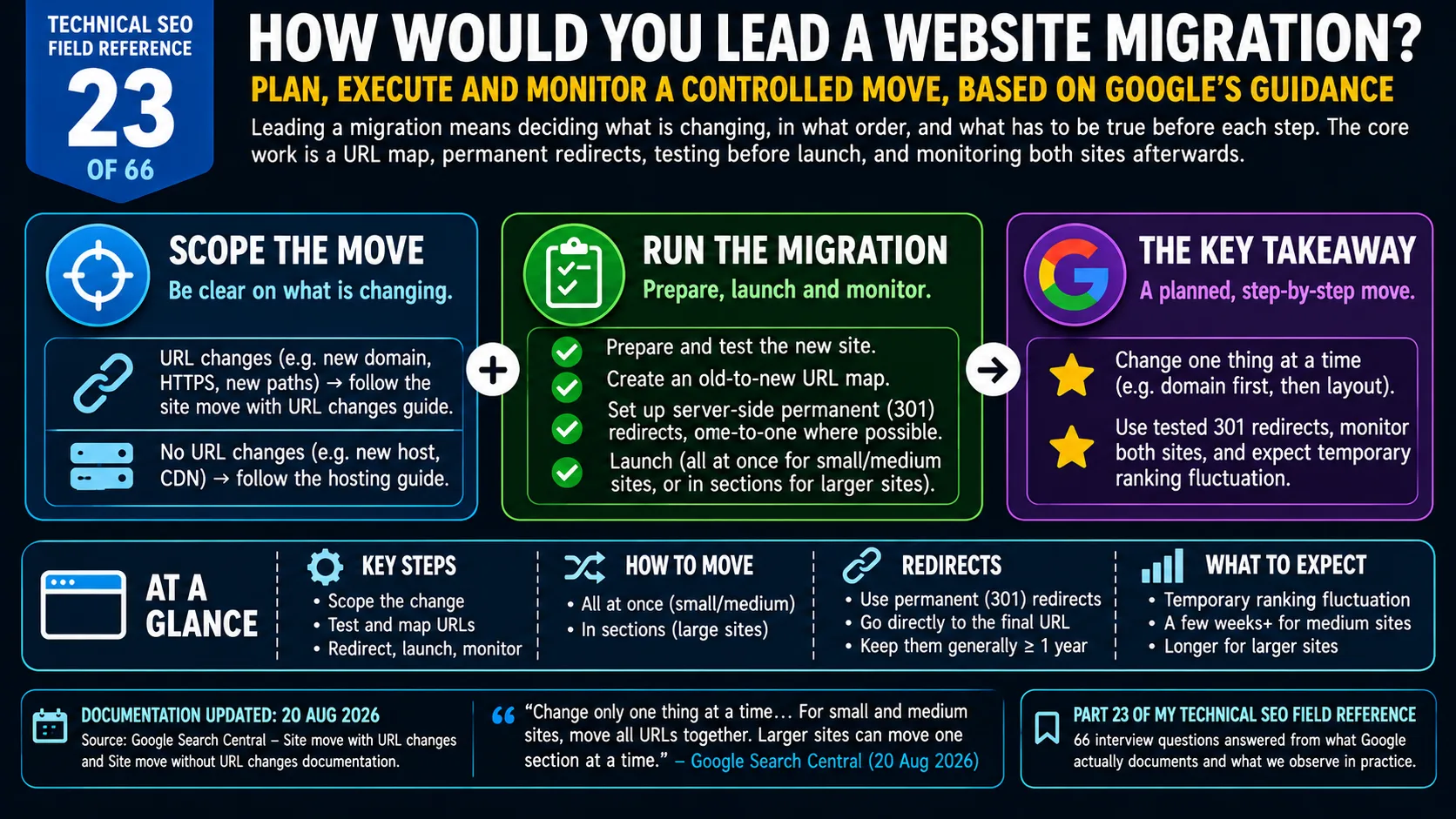
Technical SEO Field Reference, Question 23 of 66. The interview answer, checked against what Google currently documents.
Leading a website migration means deciding what is changing, in what order, and what has to be true before each step. Google’s site move guidance separates moves that change URLs from moves that only change hosting, and it recommends changing one thing at a time. For a move with URL changes, the core work is an old-to-new URL map, server-side permanent redirects, testing before launch, and monitoring both sites afterwards. Google suggests moving small and medium sites all at once, while large sites can move in sections. It does not document a general rollback plan, so the lead has to define one before launch.
An interviewer asks how you would lead a website migration. Most candidates start with redirects.
I would start with a different question: what exactly is changing?
Why leading a website migration matters
A migration is the one SEO project where a single mistake can reach every URL at once. A bad title tag affects a page. A bad redirect rule can affect the whole site.
The person leading it does not need to run every check personally. They need to make sure the right decisions are made in the right order, by the right people, before launch day.
That is what the interviewer is listening for: scope, sequence, gates and a way back.
This question covers how to lead the move. The next two cover what to check at each stage and why migrations fail.
What Google says about a website migration
Google’s guidance separates two situations. A move that changes URLs, such as HTTP to HTTPS, a new domain or new paths, follows the site move with URL changes guide (page last updated 20 August 2026). A move that only changes infrastructure, such as a new host or a CDN, follows the hosting guide (page last updated 10 December 2025). Deciding which guide applies is the first scoping decision.
The URL change guide gives five steps: know what to expect, prepare the new site and test it, prepare a URL mapping, redirect the old URLs to the new ones on the server, and monitor traffic on both.
It also gives advice on sequencing. Google says to change only one thing at a time, and its example is moving to a new domain first and changing the layout afterwards. It suggests timing the move for a lower traffic period if possible. For small and medium sites it recommends moving all URLs together, which helps its systems detect the move. Larger sites can move one section at a time, which makes problems easier to find and fix.
On redirects, Google recommends server-side permanent redirects and advises sending each old URL directly to its final destination. Googlebot can follow up to 10 hops, but the guide suggests keeping chains short. It also warns against sending many old URLs to one irrelevant destination, such as the new homepage, because that might be treated as a soft 404. Permanent redirects, it says, “don’t cause a loss in PageRank”. It suggests keeping them “generally at least 1 year”.
The Change of Address tool applies only to moves from one domain or subdomain to another. It is not for HTTP to HTTPS, www to non-www, or path changes within a site. Its help page gives a shorter minimum for redirects, 180 days, and says a request can be cancelled within 180 days.
Google also says to expect temporary ranking fluctuation. For a medium-sized site it can take a few weeks or more for the new URLs to replace the old ones, and longer for larger sites.
The interview answer for leading a website migration
I would start by defining what is changing: URLs, domain, platform, hosting or design. Google recommends changing one thing at a time, so if more than one is in scope I would try to split the project.
Then I would own five things: the old-to-new URL map, the redirect plan, the pre-launch tests, a launch window with a clear go or no-go decision, and monitoring of both the old and new sites. Before launch I would also agree what a rollback looks like and who can call it.
How I would lead a website migration
The table is the leadership view. The detailed checks inside each stage belong to the next question in the series.
A domain move example for a website migration
Say a retailer with around 30,000 URLs wants to change domain, replatform and redesign in one release, because the budget was approved for all three together. This is a hypothetical.
I would not simply say no. I would say what Google says: change one thing at a time. Then I would offer a sequence. Move the domain first, keeping the current templates and URL structure. Replatform second. Redesign third.
The Change of Address help page makes a related point. Keeping the same site architecture helps signals pass more directly to the new site, and combining a move with a redesign of content and URL structure will probably cost some traffic.
If the business still wants a single release, my job is to make the risk visible. A ranking drop would have three possible causes and no clean way to separate them. That is my reasoning, not a Google statement.
Planning the way back in a website migration
Google’s guides do not describe a general rollback plan. Two details are close.
For a domain move, the Change of Address page documents how to cancel: remove the redirects from old to new, add redirects from the new site back to the old, then cancel the request in Search Console. That applies for 180 days.
For a hosting move, the guide says to shut down the old infrastructure once the logs show traffic to it has reached zero.
Everything else here is my practice. I would keep the old environment intact until that point. I would agree the triggers for a rollback before launch, and name who decides. Google says a move happens per URL and is not complete until Googlebot has visited every URL, so I would expect a reversal to take time as well. That is my inference.
What I would watch as the lead after a website migration
Google recommends watching both sites. Traffic on the old site should fall while traffic on the new one rises. Search Console sitemaps for the old and new URLs show indexing moving from one to the other, and server logs show whether Googlebot is hitting errors.
Google also says it will temporarily crawl the new site more heavily after a move, because crawls of old URLs are redirected too. Server capacity is therefore part of the plan. The crawl budget post covers how Google decides how much to crawl.
Two details from earlier in the series apply. Google says content that is deliberately removed should return a 404 or 410 on the new site, and the question on 404 errors and SEO covers how Google treats them. And the redirect methods Google recognises are covered in the HTTP redirects question.
The interview trap on a website migration
The trap is answering with a redirect map and stopping. The map is necessary, but Google’s guide covers much more: scope, sequencing, testing, monitoring and timing.
A lead’s answer has decision points in it. What is changing. What has to be true before launch. Who gives the go. What happens if it goes wrong.
The second trap is promising that rankings will not move. Google says to expect fluctuation. I would set that expectation with the business before launch. Success is the old URLs handing over to the new ones, not the graph staying flat.
Takeaway
Start with what is changing, then decide the order, the gates and the way back.
A redirect map is part of the answer. The rest is deciding who owns each step and what would make you stop.
Have questions about this topic? Contact The GEO Lab · Return to homepage