
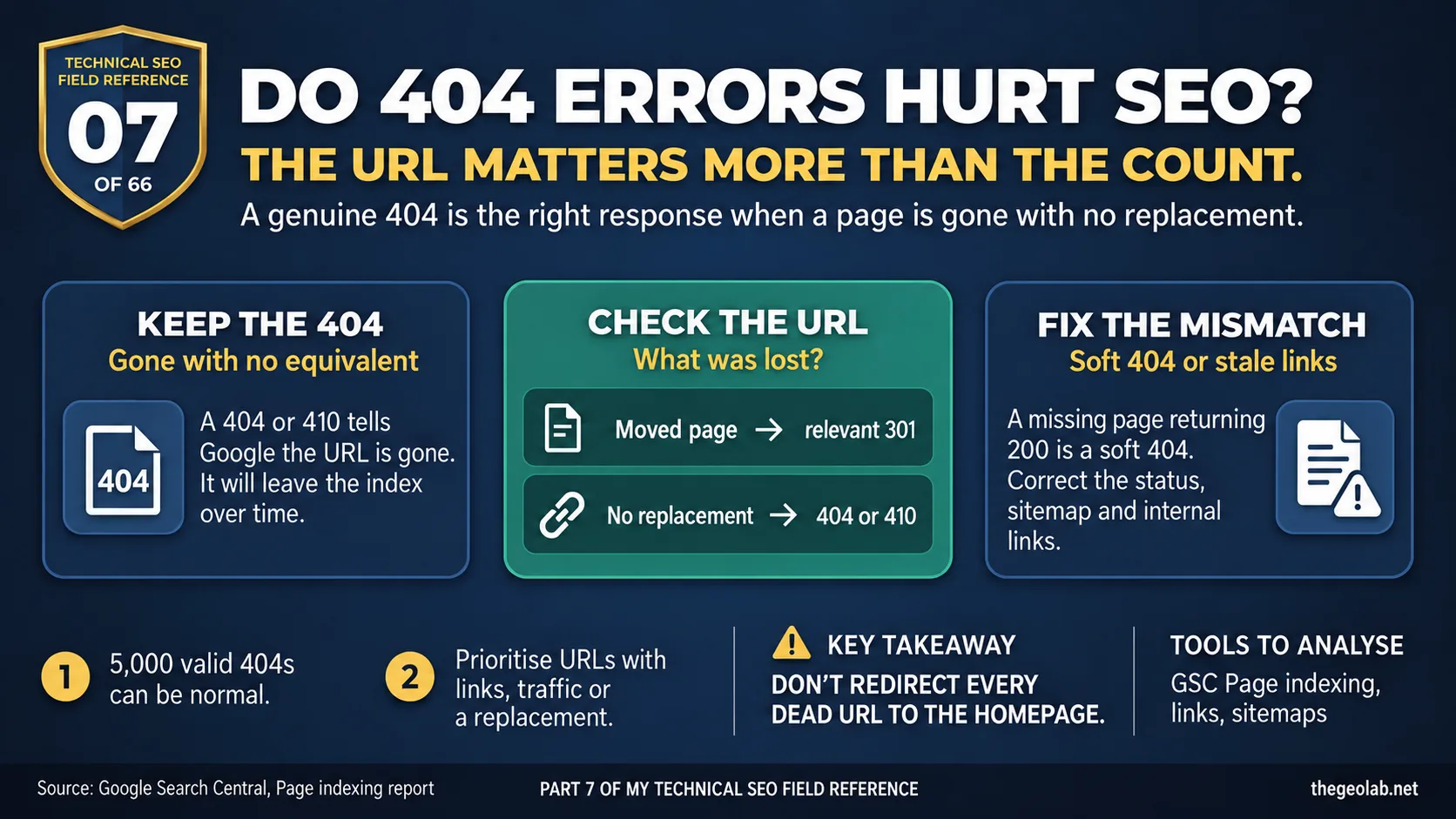
Technical SEO Field Reference, Question 07 of 66. The interview answer, checked against what Google currently documents.
A 404 means the requested page isn’t there. If you removed it and there’s no replacement, that’s the right response. Google says these 404 errors do not necessarily hurt SEO and will remove the URLs from its index over time. What matters is whether the missing URL still had something worth keeping: rankings, links, visitors or a suitable replacement. Google’s Page indexing report makes that distinction.
“Search Console says we have 5,000 404s” sounds alarming. I’ve seen teams start building redirects before checking what those URLs actually are.
The count alone tells you very little. A product that’s gone for good, a URL that never existed and a page you moved last week can all return 404. Only one of those clearly needs a redirect.
What Google says about 404 errors and SEO
For a page removed without a replacement, a 404 is normal. Google may try the URL again for a while, then crawl it less often. If the page moved, Google advises redirecting it to the new location. Source: Google Search Central, Page indexing report.
Google also says that pages returning most 4xx codes won’t stay indexed. An already indexed URL will be removed over time. That happens to the URL, not to the rankings of every other page on your site. Source: Google Search Central, HTTP status codes.
The 404 errors SEO interview answer
A 404 on a page that’s genuinely gone is the correct signal, not a site-wide SEO penalty. I’d investigate the URLs that used to rank, have useful links pointing to them, appear in the sitemap or have a live equivalent. If a page moved, redirect its old URL to the relevant new one. If it simply disappeared and nothing suitable replaced it, leave the 404 alone.
When 404 errors hurt SEO and when they don’t
| What happened? | What I’d do |
|---|---|
| The page is gone and there’s no equivalent | Keep the 404, or return 410 |
| The page moved or has a direct replacement | 301 redirect to that page |
| The dead URL is still in the sitemap | Remove or correct the sitemap entry |
| An old URL has valuable links | Check for a relevant page to redirect to |
| Someone requested a URL that never existed | Let it return 404 |
A real-world 404 errors example
Imagine those 5,000 URLs are mostly old filters and odd URLs Google discovered years ago. They never ranked and nobody links to them. Redirecting every one would take time and could send people to pages they didn’t ask for.
Then you find 30 former service or product URLs with links and a clear replacement. Those deserve attention. The useful job is dealing with those 30, even if Search Console continues to show thousands of perfectly valid 404s.
404, 410 and soft 404 errors explained
A 404 says the page isn’t found. A 410 says it’s gone. For a genuinely removed page, either can be appropriate; Google handles them similarly.
A soft 404 is different. The page says “not found” to a visitor but sends Google a 200 OK response, as though the page were live. That’s a mismatch worth fixing. If the page is gone, have the server say so too.
There’s another common mistake: redirecting every dead URL to the homepage. If the homepage doesn’t answer what the visitor came for, the redirect doesn’t solve the problem. Google may treat an irrelevant destination as a soft 404.
So when I see a large 404 report, I ask which URLs should still work or lead somewhere useful. That gives me a manageable list to investigate. Trying to make the 404 count hit zero usually doesn’t work, and the reason is straightforward: Google keeps re-requesting known-dead URLs for a while, by design, in case the error was temporary.
The 404 errors SEO interview trap
The trap is treating 404 errors as though they automatically hurt SEO performance. Two specific failure modes follow.
The first is mass-redirecting irrelevant dead URLs to the homepage. Google treats a redirect to an irrelevant page as a soft 404 anyway, so you’ve done work to create the exact problem you were trying to avoid.
The second is chasing the 404 count to zero. It won’t go to zero. Google keeps re-requesting known-dead URLs by design. The better measure is whether the URLs that had value are now either live or redirected to their correct replacement.
Understanding when 404 errors actually hurt SEO and when they don’t is closely related to how Google handles crawled but not indexed pages and how crawl budget gets spent on URLs that no longer exist. In both cases, the investigation starts with segmentation, not panic. The same principle applies to diagnosing crawl traps, where dead or redundant URLs consume crawl resources that could go to pages that actually matter.
Takeaway
Before asking “how do we get rid of all these 404s?”, ask “did any of these URLs have value a 404 is now throwing away?”
A 404 is not a problem. Losing something worth keeping is. The status code reports the loss; it doesn’t cause it.
Part 07 of my Technical SEO Field Reference: 66 interview questions answered from what Google currently documents, what we observe in practice, and where the two do not match.
Have questions about this topic? Contact The GEO Lab · Return to homepage