
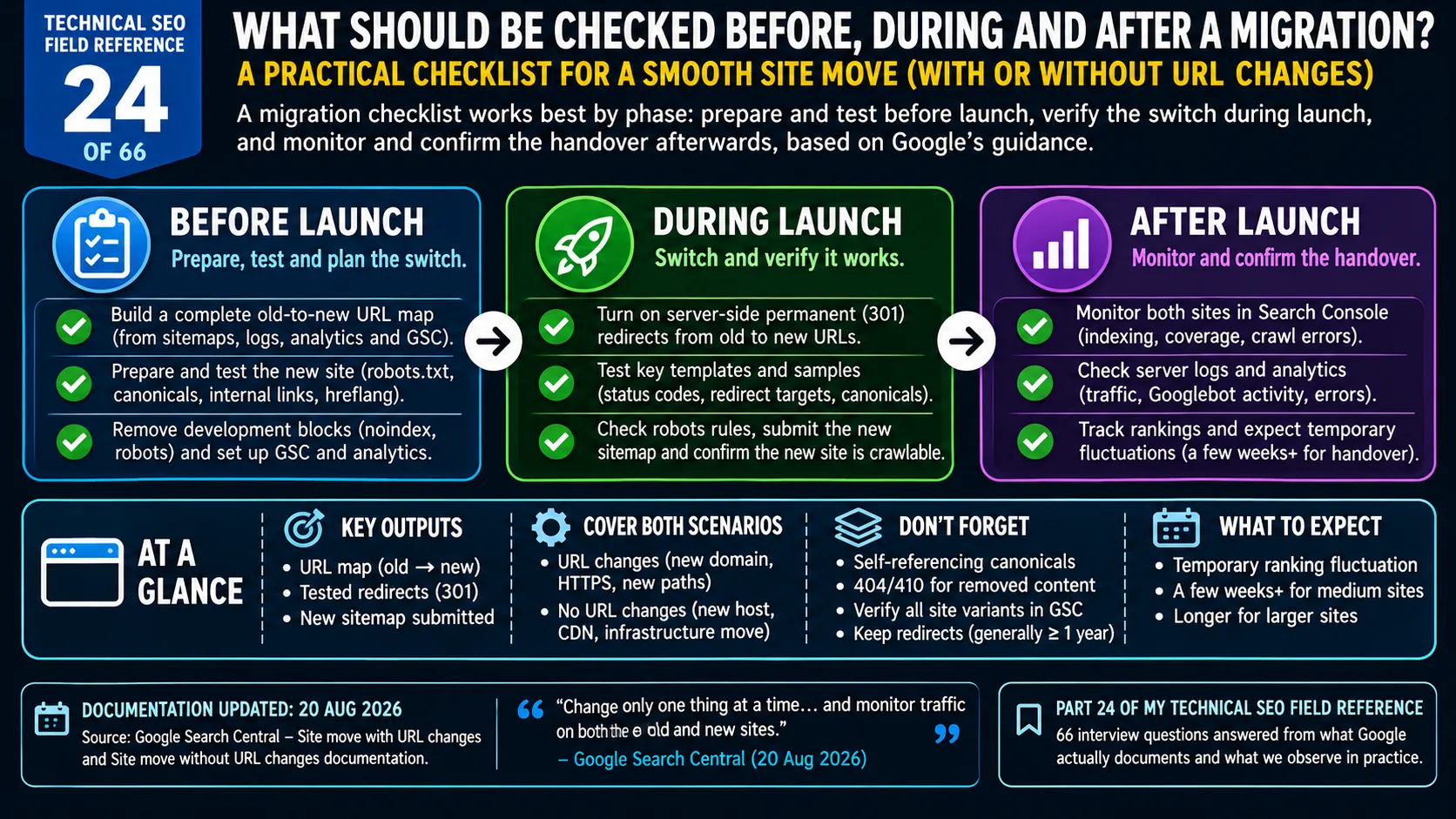
Technical SEO Field Reference, Question 24 of 66. The interview answer, checked against what Google currently documents.
A migration checklist works best when it is sorted by phase. Before launch: prepare and test the new site, map every old URL to a new one, and plan the removal of any development blocks. During launch: switch on server-side permanent redirects, test them, check canonicals and robots rules, and submit the new sitemap. After launch: watch both sites in Search Console, server logs and analytics until the old URLs have handed over. For a hosting change with no URL changes, Google’s checks centre on testing the new infrastructure, confirming Googlebot can reach it, and shutting down the old one only when its traffic reaches zero.
The easy answer to this question is a list of tools. A crawler, a redirect tester, Search Console.
The better answer is a sequence: what has to be true before the switch, what to confirm while it happens, and what tells you it worked.
The previous question covered how to lead the move. This one covers the checks that run inside it.
Why a migration checklist needs three phases
A migration checklist that is not sorted by time invites the wrong check at the wrong moment. A rankings check on launch day tells you nothing. A redirect test after Googlebot has already crawled the old URLs is late.
Each phase answers a different question. Before launch: is the new site ready, and does every old URL have a destination? During launch: did the switch do what the map says? After launch: has Google handed the old URLs over to the new ones?
That framing also shows the interviewer that you know what each check is for, not just its name.
What Google says about a migration checklist
Google does not publish a single migration checklist. Its guides give steps instead, and its site move guide points readers to third-party checklists for more detail.
The site move with URL changes guide (page last updated 20 August 2026) walks through preparing the new site and testing it thoroughly, preparing a URL mapping, configuring the server to redirect old URLs to new ones, and monitoring traffic on both. The hosting guide (page last updated 10 December 2025) covers moves with no URL changes: prepare the new infrastructure, test it, change the DNS settings, monitor, then shut the old hosting down.
For the preparation phase, the URL change guide is specific. Set up a robots.txt for the new site, and if crawling or indexing was blocked during development, prepare the final robots.txt and a list of URLs from which to remove noindex rules. Make sure deleted or merged content returns a 404 or 410. Verify every variant of both the old and new sites in Search Console, and make sure the verification method survives the move. Put analytics on both. Check server capacity, because Google will temporarily crawl the new site more heavily after a move.
For the mapping, the guide suggests building the list of old URLs from sitemaps, server logs, analytics and the Search Console links report, and including images, videos, JavaScript and CSS. On the new site, each page should have a self-referencing canonical, hreflang annotations should use the new URLs, and internal links should point at the new URLs.
The interview answer for a migration checklist
I would sort the checks into three phases and say what each one proves. Before launch, I would check the URL map, the new site’s readiness, the development blocks and the Search Console setup. During launch, I would check that the redirects, canonicals and robots rules behave as mapped, on a sample and then in bulk. After launch, I would compare old and new traffic, indexing and server logs until the old URLs have handed over. Google does not describe a baseline, but I would take one before launch so that anything that moves afterwards has something to be compared with.
Migration checklist at a glance
Before launch: the migration checklist items I would not skip
The mapping comes first. Every old URL needs a destination, or a deliberate 404 or 410. A map built only from the sitemap misses the old URLs that get traffic and links but were never submitted, which is why Google also suggests logs, analytics and the links report.
The second check is what the new site is blocking. Some site owners block crawling while a site is in development. That is sensible until launch day, so the plan needs a written list of what to open and who opens it.
For a hosting move, Google adds two checks of its own. Confirm Googlebot can reach the new infrastructure, and make sure a firewall or denial of service protection is not blocking it. And lower the DNS TTL to a conservative value, a few hours, at least a week before the move.
The baseline is my addition. Google does not describe one. I want the current indexed count, the top landing pages and the crawl pattern written down before anything changes, because a drop afterwards needs something to be measured against.
During launch: the migration checklist items I would not skip
When the redirects go live, I would test them on a sample, then in bulk. Google suggests the URL Inspection tool for individual URLs and command line tools or scripts for large numbers. The redirects should be server-side and permanent, and each should go to its final destination. The guide warns against sending many old URLs to one irrelevant page, such as the new homepage, which might be treated as a soft 404.
At launch, I would check the new site’s canonicals and robots rules. If noindex rules were used to keep the new URLs out of the index during testing, they have to be updated now. The redirect types themselves are covered in the question on HTTP redirects.
For a domain or subdomain move, I would submit the Change of Address request for every verified variant of the old domain. It is not needed for HTTP to HTTPS, www changes or path moves. Then I would submit the new sitemap.
After launch: the migration checklist items I would not skip
The after phase is where I find out whether the launch worked. I would watch old and new traffic, the Search Console sitemaps for both sets of URLs, and the indexing reports. Google says the old-URL sitemap will show indexed pages falling as the new-URL sitemap rises, and that Search Console may warn about redirecting URLs in the old sitemap, which is normal.
Server logs matter here. The guide asks for a check on Googlebot crawling and on any URLs that unexpectedly return error status codes. After a hosting change, Google says a temporary drop in crawl rate followed by a steady increase is normal.
I would also update links. Internal links should point directly to the new URLs, and Google suggests contacting the sites that link to the old ones. The redirects stay, generally for at least a year.
Then I would wait, and not read too much into the first week. Google says rankings can fluctuate during a move, that a move is complete only once Googlebot has visited every old and new URL at least once, and that a medium-sized site can take a few weeks or more to settle. If many new URLs sit in the indexing statuses for a long time, the questions on Crawled – currently not indexed and Discovered – currently not indexed are where I would start.
A launch day example for a migration checklist
Say a site launches on a new domain. Every old URL returns a 301 to the right page, and the ticket is closed. This is a hypothetical.
Two days later the new pages are not appearing. The new site’s robots.txt still has the rule that blocked all crawling during development.
Google’s guide anticipates this. It tells you to prepare what the robots.txt file should look like once the move starts. That is why I would put “fetch the live robots.txt and inspect one new URL” at the top of the launch list, before looking at anything else. The difference between blocking crawling and blocking indexing is covered in the question on robots.txt versus meta robots.
The interview trap on a migration checklist
The trap is reciting a tool list. A crawler, a log analyser and Search Console are the means, not the answer. The interviewer wants the checks, the phase each belongs to, and what each one proves.
The second trap is treating launch day as the end. Google describes the move as per-URL and incomplete until Googlebot has visited every URL. The after phase is where you learn whether it worked.
The third is checking that redirects return a 301 without checking where they go. A correct status code on a redirect to the wrong page, or to one irrelevant page, still fails the map.
Takeaway
Sort the checks by phase, and say what each one proves.
The before phase is about the map and the blocks. The during phase is about whether the switch matches the map. The after phase is about whether Google has handed over.
Have questions about this topic? Contact The GEO Lab · Return to homepage