
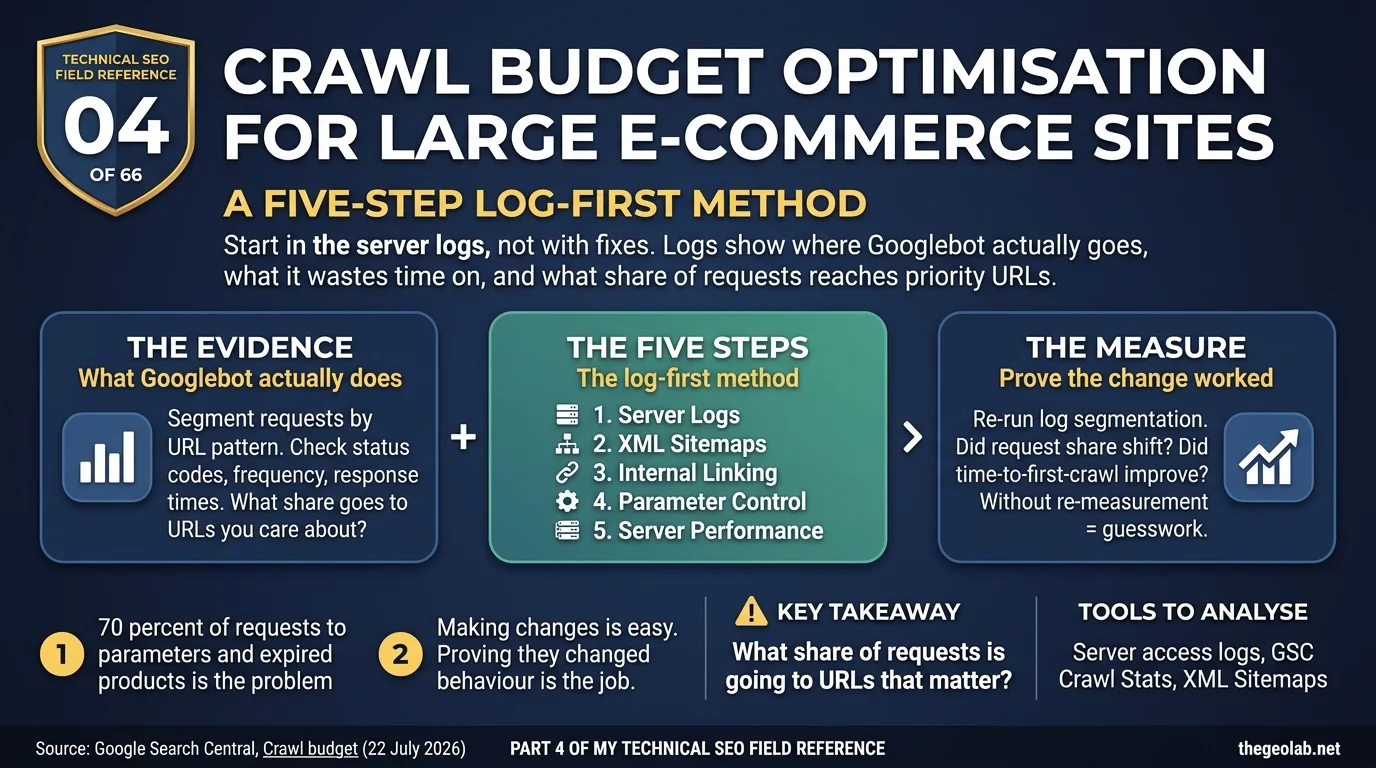
Technical SEO Field Reference, Question 04 of 66. The interview answer, checked against what Google currently documents.
Solving crawling problems on a large e-commerce website starts with server log analysis, because the logs show which URLs Googlebot is actually requesting, how often, and what response codes it gets back. From there, I’d work through five things in order: logs, XML sitemaps, internal linking, parameter and faceted URL handling, and server response times. Google’s crawl budget guidance is aimed specifically at the kind of sites where this becomes a real problem: very large sites and sites that automatically generate large numbers of URLs.
This is one of those interview questions where it becomes obvious pretty quickly whether someone has actually dealt with the problem.
Anyone can talk about crawl budget optimisation.
But when an e-commerce site has millions of URLs, thousands of products changing every week and filters capable of creating almost unlimited combinations, theory only gets you so far.
I’d want to know where Googlebot is actually going, what’s wasting its time, which pages the business needs crawled, and what I’m going to measure after making changes.
So I wouldn’t start with a fix.
I’d start with the evidence.
What Google actually says about crawl budget optimisation
Google’s current crawl-budget guidance is specifically relevant to large sites and sites that automatically generate URLs.
E-commerce is an obvious example because faceted navigation can turn a fairly normal product catalogue into a huge crawlable URL space. Google’s faceted-navigation documentation describes the problem as effectively infinite URL spaces. Filters and parameters can generate enormous numbers of URLs, leading to overcrawling and slower discovery of URLs that actually matter. This is the same crawl trap problem at scale.
There’s also the capacity side. Google adjusts crawling according to how the server behaves. If Googlebot encounters slow responses, 5xx errors or 429 responses, crawling can slow down. A fast, healthy server gives Google more room to crawl when demand exists.
So on a large e-commerce site, I’m looking at both sides of the crawl budget optimisation problem:
Where is Googlebot spending its crawling activity?
And: is anything limiting its ability to crawl the URLs we actually want?
The crawl budget optimisation interview answer
If I had to answer this quickly in an interview:
I wouldn’t start by trying to increase crawl budget. I’d start with server logs to see where Googlebot is actually spending its requests.
From that evidence, I’d work through five areas, each touching a different layer of the GEO Stack: XML sitemap hygiene, internal linking to priority URLs, parameter and faceted URL control, and server response times. Then I’d go back to the logs and measure whether Googlebot’s crawling shifted towards the URLs that matter.
The important part is that last sentence. Making changes is easy. Proving they changed Googlebot’s behaviour is the job.
My five-step crawl budget optimisation method
1. Start with the server logs
Before changing anything, I want to know what Googlebot is actually doing. I’d segment requests into useful URL groups: products, categories, faceted URLs, parameters, pagination, internal search, expired products.
Then I’d look at status codes, request frequency and response times for each group. I’m trying to answer two basic questions: what share of Googlebot’s requests is going to URLs I actually care about? Are important URLs being crawled as often as the business needs them to be? This is the retrieval probability question at scale.
This is why I start with logs rather than a third-party crawler. A crawler tells me what Googlebot could reach. The server logs tell me what Googlebot actually requested.
2. Clean up the XML sitemaps
Next, I’d compare the inventory we’re declaring to Google with the inventory Googlebot is actually crawling. I want the XML sitemaps to contain URLs we genuinely want Google to process: canonical, indexable, 200-status URLs. On a very large site, I’d also split them logically: products, categories, perhaps brands or other important page types.
But I wouldn’t expect a sitemap to fix the problem by itself. Putting a URL in an XML sitemap can help Google discover it. It doesn’t automatically create crawl demand.
3. Look at internal linking
Now I want to see whether the URLs the business cares about actually have strong crawlable paths. Can Googlebot reach new-season products through normal HTML links? Are important categories buried behind pagination? Do we have orphaned products sitting in sitemaps but barely connected to the site? And what about the opposite problem: are thousands of discontinued products still linked everywhere even though nobody wants them indexed anymore?
On large e-commerce sites, internal linking isn’t just about PageRank distribution. It also shapes the crawlable inventory Googlebot keeps encountering.
4. Deal with parameters and facets
This is often where the biggest mess is hiding. A category might look perfectly reasonable to a shopper: colour, size, price, brand, sort order. But let every combination generate crawlable URLs and suddenly you’ve created a URL space vastly larger than the product catalogue itself.
So I’d decide which facet combinations genuinely deserve indexable landing pages. Then I’d control the rest. That might involve changing internal linking so unnecessary combinations aren’t exposed as crawlable URLs, using appropriate robots.txt rules for patterns that shouldn’t be crawled, and using indexing controls where indexing rather than crawling is the problem. The important bit is not applying the same treatment to every facet. Some filtered pages may have real search value. Others are just machines for generating URLs.
5. Check server response times
Finally, I’d look at what Googlebot experiences when it actually requests these pages. Not just the site’s average speed. Response times by URL pattern. Maybe product pages are fine, but uncached parameter combinations are hammering the origin. Maybe Googlebot is hitting 5xx responses during peak periods. Maybe we’re returning 429s because the infrastructure can’t comfortably handle the request volume. Those are crawl-capacity problems I can actually do something about.
The crawl budget optimisation method in one table
| Step | What I check | Tool | What it tells me |
|---|---|---|---|
| 1. Logs | Requests by URL pattern, status and response time | Server logs + Crawl Stats | Where Googlebot actually spends its activity |
| 2. Sitemaps | Declared vs observed inventory, canonical 200 URLs | XML sitemaps + GSC + logs | What Google knows about but may not be crawling |
| 3. Internal linking | Crawlable paths, orphaned and expired inventory | Site crawler + link data + logs | Which URLs need stronger paths or retiring |
| 4. Parameters | Facets and crawlable permutations | Logs + robots.txt + URL Inspection | Which combinations should exist |
| 5. Server | Response times and error rates by pattern | Logs + Crawl Stats | Whether server behaviour is limiting capacity |
A real-world crawl budget optimisation example
Say I’m looking at a fashion marketplace with 5 million URLs. The first thing the logs tell me is ugly: 70% of Googlebot requests are going to parameter combinations and expired products. Meanwhile, new-season products can take up to three weeks to get their first crawl.
Now I have something worth investigating. The sitemaps reveal 400,000 expired products still hanging around. Internal-link analysis shows that the new-season categories have weak crawlable paths. The logs show colour, size and sorting permutations being requested across the site. And those parameter pages are also among the slowest responses because they’re largely uncached.
That’s not one “crawl budget problem.” It’s several problems feeding into the same outcome. So I work through them in order. Clean the sitemap inventory. Strengthen crawlable paths to the new-season categories. Decide which facets genuinely deserve URLs and stop exposing the rest unnecessarily. Then deal with the performance problem the logs have already identified.
And four weeks later? I don’t judge success by whether total Googlebot requests went up. I run the same segmentation again. Has the share of requests going to priority URLs increased? Has time-to-first-crawl for new products improved? That’s the result I care about.
The technical detail behind crawl budget optimisation
The order matters to me. If the site is exposing a practically unbounded parameter space, I want to understand and control that before blindly adding more links to important URLs. Otherwise I’m improving discovery while leaving the underlying crawl waste untouched.
Expired products are another place I’d spend time. There’s no single answer for every discontinued product. A 404, 410, redirect or retained product page can all make sense depending on what happened to the product and whether a genuine replacement exists.
This is another reason logs matter. Search Console’s Crawl Stats gives me the aggregate picture. Logs give me attribution. They show which patterns Googlebot keeps coming back to.
The crawl budget optimisation interview trap
The obvious answer is: “We need more crawl budget.” That’s starting with the solution before you’ve diagnosed the problem. On a large e-commerce site, Googlebot may already be crawling plenty. It may simply be crawling the wrong URLs.
I also wouldn’t reach for crawl-delay. Google’s crawlers don’t support the crawl-delay robots.txt directive.
The subtler mistake is treating this as a one-off clean-up. E-commerce URL spaces grow back. New filters appear. New product templates launch. Seasons change. Old inventory expires. Developers add a parameter you didn’t know existed. So this isn’t really a five-step project. It’s a five-step loop.
Takeaway
I wouldn’t ask: “How do we get Google to crawl more?” I’d ask: “What share of Googlebot’s requests is going to URLs that matter, and which lever will move that share?”
Then I’d make the change, go back to the logs, and see whether I was right.
Because crawl budget optimisation without re-measurement is mostly guesswork.
Part 04 of my Technical SEO Field Reference: 66 interview questions answered from what Google currently documents, what we observe in practice, and where the two do not match.
Have questions about this topic? Contact The GEO Lab · Return to homepage