
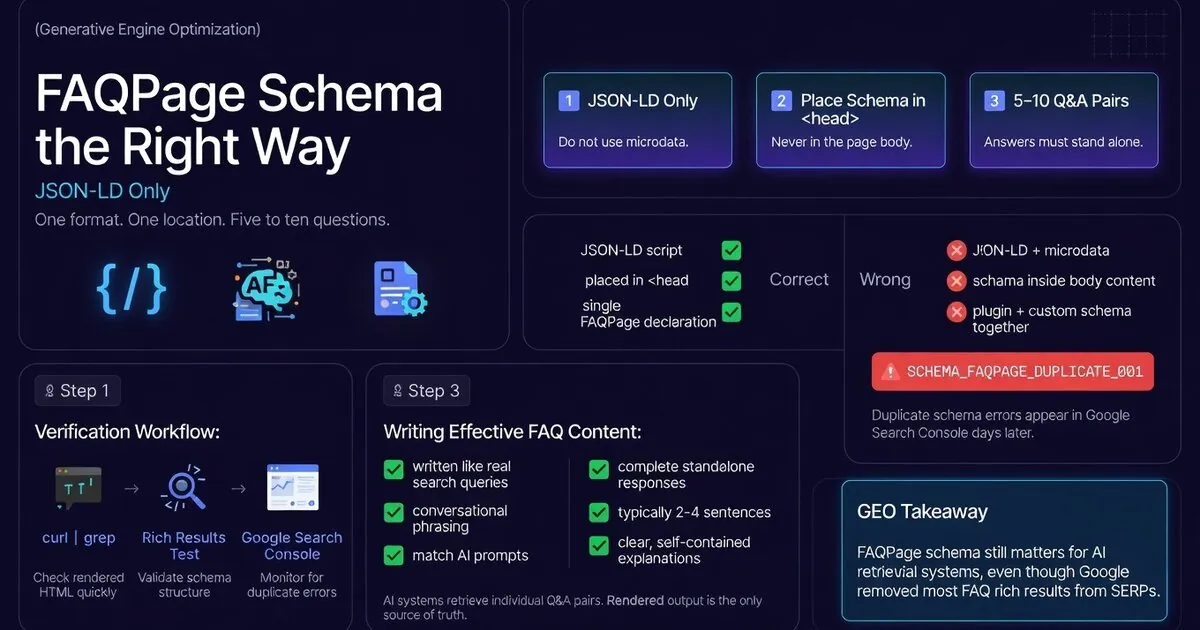
One format, one location, five to ten questions — and why getting any of these wrong creates a GSC error with no frontend symptom
FAQPage schema: JSON-LD only, in the page head, never microdata. One declaration per page. Five to ten Q&A pairs. Answers that stand alone as complete responses.
Worth knowing: Google stopped showing FAQ rich results for most sites in August 2023. I discovered this while building the audit system, which was a slightly embarrassing moment given I’d been adding FAQ schema to everything. The schema still matters — AI retrieval systems read it — just not for the accordion treatment in SERPs. The implementation requirements haven’t changed. The error for getting it wrong (SCHEMA_FAQPAGE_DUPLICATE_001) is silent until GSC emails you, 3–5 days after it’s already live.
The Three Rules for FAQPage Schema
- Use JSON-LD in a
<script type="application/ld+json">block - Place the script block in the page
<head> - Use 5–10 Q&A pairs per page
- Write answers that stand alone as complete responses
- Match questions to how users would phrase a real query
- Verify the rendered output with
curl | grep FAQPage
- Use
itemscope itemtype="https://schema.org/FAQPage"in HTML - Use both JSON-LD and microdata on the same page
- Place FAQPage schema in the body or post content
- Let a plugin output FAQPage schema if you also have custom JSON-LD
- Use the same URL twice in the same page’s internal links
- Assume the schema is clean without checking the rendered output
The most common FAQPage schema failure on WordPress is duplicate structured data output. RankMath, Yoast, and other SEO plugins auto-generate FAQPage JSON-LD from post content, producing a second FAQPage declaration alongside any manually added schema. On a WordPress site with RankMath or any schema plugin active, there may be two FAQPage declarations in the rendered output — one from your custom JSON-LD, one from the plugin. Both are valid individually. Together they trigger SCHEMA_FAQPAGE_DUPLICATE_001. GSC emails you about it 3–5 days later.
The Correct JSON-LD Pattern
Full FAQPage JSON-LD structure as implemented across thegeolab.net — five question-answer pairs, each answer written to stand alone as a complete response to the query:
Correct — JSON-LD in page head<script type="application/ld+json">
{
"@context": "https://schema.org",
"@type": "FAQPage",
"mainEntity": [
{
"@type": "Question",
"name": "What is generative engine optimisation?",
"acceptedAnswer": {
"@type": "Answer",
"text": "Generative engine optimisation (GEO) is the practice of designing
content to be retrieved, extracted, and cited by AI search systems.
Unlike traditional SEO, which optimises entire pages for position in
ranked results, GEO optimises individual content sections for inclusion
in AI-generated answers."
}
},
{
"@type": "Question",
"name": "How is GEO different from SEO?",
"acceptedAnswer": {
"@type": "Answer",
"text": "SEO optimises for rankings and click-through rate using page-level
signals like backlinks and domain authority. GEO optimises for retrieval
and citation rate using section-level signals like extractability and
entity clarity. The optimisation unit is different: SEO is
document-centric, GEO is retrieval-centric."
}
}
]
}
</script>And the pattern to avoid — microdata attributes on the FAQ HTML that, combined with the JSON-LD above, produce a duplicate declaration:
Wrong — microdata + JSON-LD = duplicate<!-- This creates a second FAQPage declaration -->
<div itemscope itemtype="https://schema.org/FAQPage">
<div itemscope itemprop="mainEntity" itemtype="https://schema.org/Question">
<h3 itemprop="name">What is GEO?</h3>
<div itemscope itemprop="acceptedAnswer" itemtype="https://schema.org/Answer">
<p itemprop="text">GEO is...</p>
</div>
</div>
</div>If you’ve previously used microdata for FAQ sections and switched to JSON-LD: removing the JSON-LD script block is not enough. You must also strip every itemscope, itemtype, and itemprop attribute from the FAQ HTML elements. GSC’s Rich Results Test will show both declarations if any microdata remains.
Going deeper? GEO for WordPress covers the full technical setup — from schema markup to server configuration — for making WordPress sites AI-retrievable.
Going deeper? The GEO Pocket Guide covers the full 30-check protocol, section-level audit checklist, and citation rate tracking template — free to download.
Writing FAQ Questions and Answers
Schema structure is only half the implementation. The questions and answers themselves determine whether the schema is useful as a retrieval signal.
Questions
Write questions the way a user would phrase a query to ChatGPT, Gemini, or Perplexity — not the way you’d write a heading. “What is FAQPage schema?” is a heading. “Does FAQPage schema still work in 2026?” is a query. The question in the schema should match the retrieval query you want to rank for.
Answers
Per the FAQPage schema documentation, each answer should stand alone as a complete, accurate response to the question — without requiring the reader to have read anything else on the page. AI retrieval systems extract individual Q&A pairs. If the answer references context from earlier in the page (“as mentioned above”), that context won’t be present when the pair is extracted in isolation.
The working range for thegeolab.net is 5–10 pairs per page. Below 5, the schema adds minimal retrieval signal. Above 10, individual answers tend to shorten and become less substantive. The target is answers long enough to be genuinely useful — typically 2–4 sentences — not answers optimised for brevity.
Implementation on WordPress
On a WordPress site, FAQPage JSON-LD can be output in three ways. Only one of them is safe to use alongside a schema plugin like RankMath:
-
Via
functions.phpusingwp_headAdd the JSON-LD viaadd_action('wp_head', 'output_faqpage_schema'). Gives you full control over which pages receive the schema and what it contains. Safe alongside RankMath as long as RankMath’s own FAQ schema output is disabled. -
Inline in post content as a
<script>block Placed directly in the post content, inside a<!-- wp:html -->wrapper to preventwpautopfrom processing it. Works for posts where the FAQ is page-specific. Risk: iffunctions.phpalso outputs FAQPage schema for that page, you’ll have a duplicate. -
Via RankMath’s FAQ block RankMath outputs FAQPage JSON-LD when you use its FAQ block in the editor. Safe only if you have no other FAQPage schema on the page. If you also have custom JSON-LD from
functions.phpor inline in the content, disable RankMath’s FAQ schema output entirely.
On thegeolab.net: FAQPage JSON-LD is output via functions.php for core pages and the homepage, and inline in v3 post content for individual posts. RankMath’s FAQ block is not used. audit.py Module 6 verifies FAQPage schema coverage across functions.php (checking for a minimum of two instances) and flags any page with a duplicate declaration.
How to Verify Your Implementation
Three checks, in order of speed:
The GEO compliance audit system includes a dedicated FAQPage verification check — the 71-check audit system flags duplicate schema output, missing answer length, and JSON-LD graph conflicts that the Google Rich Results Test does not catch.
Check 1 — curl grep (fastest)curl -s https://yourdomain.com/your-page/ | grep -c "FAQPage"Output should be 1. Output of 2 or higher means a duplicate declaration is present in the rendered HTML.
https://search.google.com/test/rich-resultsEnter your page URL. The tool will show all detected schema declarations. Two FAQPage entries means a duplicate. One entry, correctly structured, means the implementation is clean.
Check 3 — GSC Rich Results reportGoogle Search Console → Enhancements → FAQ. Any “Duplicate field” errors will appear here — but this check is the slowest, as GSC may take days to process newly deployed pages.
The curl | grep check takes under 10 seconds and should be run after every deployment that touches schema. It’s the last step in the v3 deployment checklist for a reason.
FAQPage JSON-LD in the page head. No microdata. No plugin FAQ blocks if you have custom JSON-LD. Five to ten Q&A pairs per page with answers that stand alone. I built verification into the deployment checklist after finding a duplicate that only showed up in rendered output — not in the source file — the duplicate error is silent until GSC emails you.
Frequently Asked Questions
Should I use JSON-LD or microdata for FAQPage schema?
JSON-LD only. Microdata requires adding itemscope, itemtype, and itemprop attributes directly to your HTML elements — which creates a second FAQPage declaration if you also have JSON-LD in the page head. Two valid declarations of the same schema type trigger a GSC “Duplicate field: FAQPage” error. JSON-LD keeps the schema in a single script block, separate from the HTML, with no risk of duplication from the markup format itself.
Where should FAQPage JSON-LD be placed?
In the page <head>, inside a <script type="application/ld+json"> block. Not in the body, not inline with content. One location, one declaration. If you are using a plugin that also outputs FAQPage schema, verify the rendered output — not the editor — to confirm only one declaration is present.
How many FAQ questions should FAQPage schema have?
Five to ten question-answer pairs per page is the working range for thegeolab.net. Fewer than five adds minimal retrieval signal. More than ten tends to produce shorter, less substantive answers. Each answer should be 2–4 sentences — long enough to stand alone as a complete response to the question without requiring context from elsewhere on the page.
Does FAQPage schema still generate rich results in Google Search?
Not for most sites. Google stopped showing FAQ rich results for general websites in August 2023. Only government and health authority sites retained eligibility. The schema remains valid and is processed by Google and AI retrieval systems — it just no longer generates the dropdown expansion in standard SERPs for most publishers. The implementation requirements haven’t changed.
How do I check if my FAQPage schema has a duplicate declaration error?
Three ways. Fastest: curl -s https://yourdomain.com/page/ | grep -c "FAQPage" — output should be 1. Thorough: Google’s Rich Results Test at search.google.com/test/rich-results — shows all detected schema declarations. Slowest: Google Search Console Rich Results report — may take days to reflect newly deployed pages.