
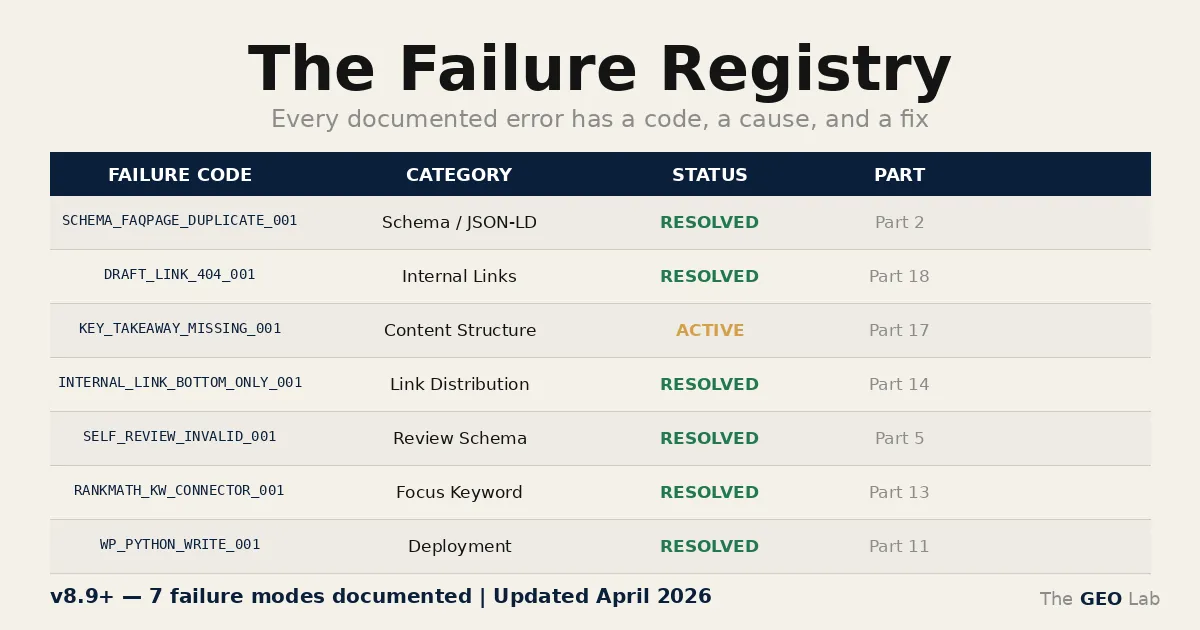
A lookup table for things that broke. 15 categories, one purpose: make the second time two minutes.
The failure registry is a YAML file on the VPS. Every time something breaks and gets fixed on thegeolab.net, the failure goes in: registry ID, symptom, root cause, exact fix, dates. That’s it.
It’s not a post-mortem. It’s not a retrospective. It’s a lookup table — the kind you want to exist at 11pm when something is broken and you’re not sure if you’ve seen it before. Fifteen categories. More being added.
Why The Failure Registry Exists in GEO Stack
The GEO Lab Failure Registry documents every failed approach, incorrect assumption, and validated fix across the thegeolab.net WordPress implementation. Most engineering projects accumulate a failure registry not because anything dramatic happened — no single catastrophic failure that made the case for documentation. Just experience: Google’s SRE postmortem methodology demonstrates this principle at scale — complex technical implementations accumulate failures, and failures that aren’t written down get solved again.
The failure registry is preemptive. It starts before the first entry, not after.
The question it answers is simple: “Have I seen this before?” The answer is either in the registry or it isn’t. If it is, the fix is there too. If it isn’t, it will be after today.
What Goes In: GEO Failure Registry Structure
Every entry has the same structure. Designed for lookup, not reading — nobody reads the failure registry linearly. They search it.
-
id
A unique, searchable identifier following a category prefix pattern:
WP_RANKMATH_003,SCHEMA_FAQPAGE_DUPLICATE_001,SITEMAP_INDEX_001. The prefix is the category; the number is the entry count within it. - symptoms Exactly what was observable. Not what was suspected — what was actually visible. Error message text, GSC notification wording, the specific wrong value in the page source.
- root_cause The actual technical reason. One level deeper than the symptom.
- fix The exact command, setting path, or code change. Reproducible without memory.
- date_added When the failure surfaced.
- date_fixed When it was resolved.
- severity Where relevant: critical (silent visibility loss), standard, or informational.
Going deeper? The GEO Field Manual is the complete practitioner guide — step-by-step implementation for every GEO Stack layer with worked examples.
Going deeper? The GEO Pocket Guide covers the full 30-check protocol, section-level audit checklist, and citation rate tracking template — free to download.
The 15 Categories
Each category maps to a layer of the stack. Sitemap errors are infrastructure. Schema errors are structured data. GEO Compliance errors are content-layer failures against the GEO Stack criteria. The categories aren’t organised by severity — they’re organised by where in the stack the failure lives.
Selected Entries
Representative examples from different categories. The full YAML isn’t published — but these illustrate the range and the entry format.
Three pages with no structured data, no OG tags, no robots meta, and no RankMath SEO fields in the page source. Pages looked completely normal in the browser.
Custom PHP templates missing <?php wp_head(); ?> before </head>. WordPress and all plugins hook their <head> output to the wp_head action. Without it, nothing fires.
Add <?php wp_head(); ?> immediately before </head> in each affected template.
audit.py.GSC email: “Duplicate field: FAQPage detected across your site.”
JSON-LD FAQPage schema injected via functions.php + HTML microdata itemtype="https://schema.org/FAQPage" on the same pages. Two valid declarations of the same schema type. Neither wrong in isolation — the conflict only exists when both are present.
Remove all itemscope / itemprop / itemtype attributes from FAQ HTML. Keep JSON-LD only. Re-submit affected pages to GSC.
sitemap_index.xml only listing page-sitemap.xml. All other sitemaps returning valid XML at direct URLs but absent from the index.
RankMath sitemap index cache not invalidated when new content types are added after initial configuration. Index reflects state at last cache generation, not current state.
Toggle Posts sitemap off and back on in RankMath → Sitemap settings to force regeneration.
DELETE FROM wp_options WHERE option_name LIKE '%rank_math_sitemap%'“Submission failed. Please try again or contact us.” PHP error log: Permission denied: google-credentials.json
google-credentials.json owned by root:root. PHP and shell_exec run as www-data. www-data cannot read a file owned by root with default permissions.
chown www-data:www-data /var/www/thegeolab/wp-content/themes/geolab-theme/google-credentials.jsonWhat It’s Not
The failure registry is not a complaint log. It doesn’t exist to catalogue what RankMath got wrong, or what Google Forms should have done differently. Several of the entries are straightforward configuration mistakes — wrong file ownership, a setting that defaults to off when it should be on, a wp_head() call missing from a template.
These aren’t interesting failures. They’re the kind of thing that happens once, takes 20 minutes to debug, and should take 2 minutes the second time. That’s the purpose: make the second time 2 minutes.
The Audit System Connection
The audit system built in March 2026 — 6 modules, 71 checks — was built in parallel with the registry. The relationship is direct: failures that appear in the registry become candidates for automated checks. When a failure can be expressed as a deterministic check, it moves from “documented fix” to “prevented regression.”
Not all registry entries have automated checks. WP_WPHEAD_MISSING_001 is in the registry but not in audit.py — detecting it requires scanning custom PHP templates for missing hook calls, which isn’t currently implemented. The registry is honest about what it prevents and what it just documents.
The audit system catches six of the ten RankMath failures in the registry. The other four are documented fixes without automated regression checks. Both states are recorded — the registry doesn’t pretend automation coverage it doesn’t have.
A failure registry is only useful if entries are written at the moment of failure — not reconstructed later. The YAML format on version-controlled VPS storage means every entry has a timestamp, a root cause, and a fix documented before the next task starts. It’s a preemptive habit, not a retrospective exercise.
Frequently Asked Questions
What format is the failure registry?
YAML, stored on the VPS. Structured entries under 15 category headers. Version-controlled alongside the codebase.
Is the full registry published?
The full failure registry is an internal document. Selected entries are documented across the blog series where they’re directly relevant — see the posts on FAQPage duplicate schema, 10 RankMath issues, the audit system, and the native WordPress form. The full YAML is an internal document.
Why 15 categories?
That’s what the stack has produced so far. Categories are added when a new type of failure appears that doesn’t fit an existing one. The count will grow.
Do all entries have automated prevention?
Automated regression coverage is partial. The audit system currently catches six of the ten RankMath failures documented in the RankMath failure log. The others are documented fixes without automated regression checks. The registry records both states.
Can I build one for my own project?
The failure registry format is intentionally adoptable. The structure is simple: ID, symptom, root cause, fix, dates, severity where relevant. The format matters less than the habit — starting the file before the first entry, not after.