
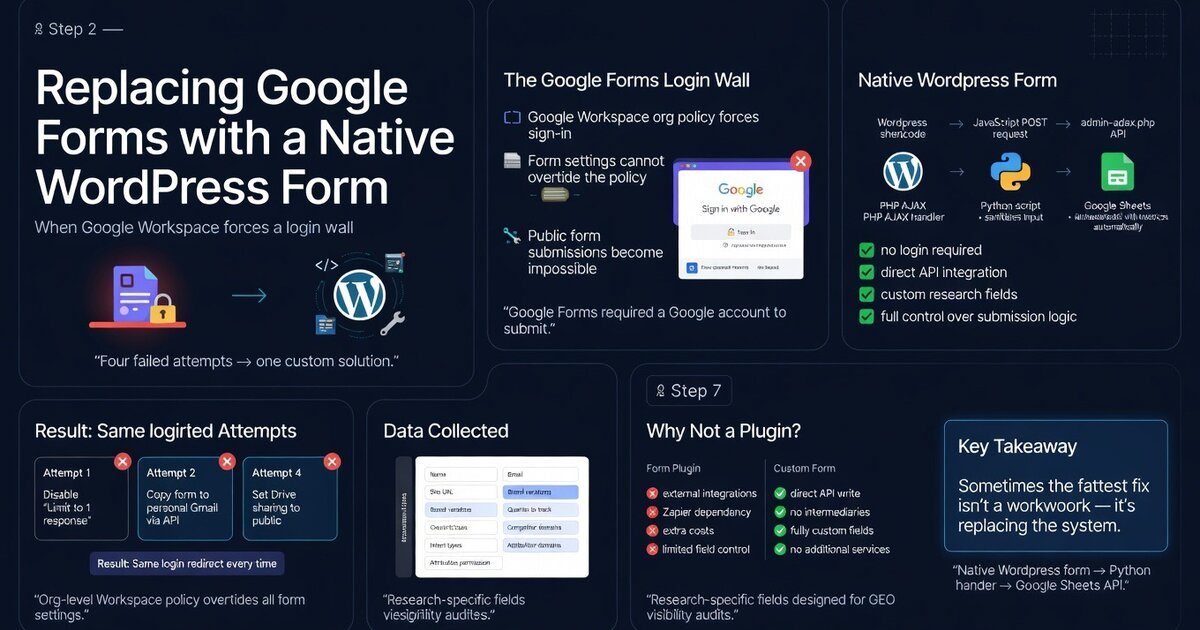
Four attempts to make Google Forms work without a login wall. All four failed. Then we built the form ourselves.
Google Forms kept forcing users to sign in with a Google account. The root cause is a Google Workspace org-level policy that can’t be overridden at the form level. We tried four things. All four hit the same wall. We started a Workspace trial to access the admin console, couldn’t find the relevant setting, and built a native WordPress form instead.
The form writes directly to Google Sheets via a Python service account. No login required. Live at the GEO Console.
The Story
Paid for a Google subscription to use Google Forms. Could not find Google Forms.
That’s the whole thing. But the four attempts that came before the subscription are worth documenting, because they’re the logical sequence anyone would try before spending money.
The Login Wall — Google Forms Problem
The form was supposed to let people submit their site for a GEO visibility audit — name, email, URL, a few research questions. Google Forms was the obvious starting point: free, connects to Sheets, no setup required.
Every time someone opened the form, Google redirected them to accounts.google.com/v3/signin. Sign in to fill out a form. The research access form was not supposed to require a Google account. That was the problem.
Going deeper? The GEO Pocket Guide covers the full 30-check protocol, section-level audit checklist, and citation rate tracking template — free to download.
Going deeper? GEO for WordPress covers the full technical setup — from schema markup to server configuration — for making WordPress sites AI-retrievable.
Four Attempts, One Wall
-
Uncheck “Limit to 1 response”
The login requirement looked like it might be tied to response tracking — limiting one response per person requires knowing who the person is. Unchecked it. Form still redirected to
accounts.google.com/v3/signin. Response limits and login requirements are separate settings. -
Copy the form to a personal @gmail.com account
The form was owned by a Workspace account. Copying it to a personal Gmail might shed the org-level policy. Same redirect. Google Workspace org-level policy applies to forms created under the org — copying doesn’t escape it. The policy travels with the form.
-
Create a blank form under personal Gmail and push fields via the API
If copying inherits the policy, start fresh. Created a new blank form under a personal Gmail account, no org association, and pushed the full field structure via the Google Forms API. Still hit the login wall. The API-created form inherited the same behavior. At this point the wall stopped looking like a setting and started looking like a policy.
-
Set Drive API sharing to “anyone with link”
Treated the form like a shared document. Set the form’s sharing permissions to public via the Drive API. Google Forms ignores Drive-level sharing for responder access — the form’s own settings and the org policy override it. Drive sharing controls who can see the file in Drive, not who can respond to the form.
Root cause across all four: Google Workspace org-level restriction forces sign-in for all forms created under the org, regardless of form-level settings. It cannot be disabled without paid Workspace admin access — and it cannot be circumvented at the form level at all.
The Workspace Trial
So we started a Google Workspace Business Standard trial — the plan with admin console access.
Then we tried to find Google Forms in the admin panel at admin.google.com.
The Google admin console has a lot going on. Apps, services, settings, sub-settings, dashboards that look like they were designed by different teams across different years without much coordination. It’s the Google equivalent of a drawer that’s been accumulating things since 2010 — technically everything is in there, but finding the specific thing you need when you need it is a different matter. We searched for Forms. Checked the Apps panel. Read documentation that described menu paths that didn’t match what was on screen — which usually means the documentation was written for a previous version of the UI.
We gave up. Not dramatically. Just: this is taking longer than building the alternative, so we’re building the alternative. The trial ended.
What We Built Instead — WordPress Solution
A native WordPress form. 100% custom — no plugin. HTML, CSS, JavaScript, PHP AJAX handler, and Python script, all registered as a [research_access_form] shortcode in functions.php. Styled to match the site: DM Sans font, #8b6914 gold accents, same visual weight as the rest of the layout.
→ PHP AJAX handler (admin-ajax.php + nonce)
→ shell_exec(“python3 form-handler.py ‘$json’”) via escapeshellarg
→ form-handler.py authenticates via google-credentials.json (service account)
→ gspread appends row to Google Sheets
The Flow
[research_access_form]shortcode infunctions.phprenders the form with embedded CSS and JS- User submits → JavaScript POSTs to
admin-ajax.phpwith nonce - PHP handler validates nonce, sanitises input, calls
shell_exec()withescapeshellargfor the Python call form-handler.pyauthenticates viagoogle-credentials.json(service account), appends a row viagspread
11 Fields Collected
| # | Field | Type | Required |
|---|---|---|---|
| 1 | Timestamp | Auto-generated | — |
| 2 | Name | Text | No |
| 3 | No | ||
| 4 | Site URL | URL | No |
| 5 | Site type | Radio: Blog, SaaS, Service, E-commerce, Agency, Other | No |
| 6 | Brand name variations | Text | Yes |
| 7 | Main question | Textarea | No |
| 8 | Queries to track (4–10) | Textarea, one per line | Yes |
| 9 | Intent types | Checkboxes: Brand, Category, Use case, Comparison, Local | Yes |
| 10 | Competitor domains | Textarea, one per line | No |
| 11 | Attribution permission | Radio: yes with name, anonymised, no | Yes |
No login required. Submissions write directly to the spreadsheet. The form is live at thegeolab.net/console.
Why No Plugin
The standard answer to “I need a WordPress form” is a form plugin. Any of them would have handled the HTML and submission logic. The reason for custom code here was the Google Sheets integration.
Form plugins connect to Sheets via third-party add-ons or Zapier — a second dependency, usually a paid tier, and a data pipeline that routes through someone else’s servers. The custom implementation authenticates directly via a Google service account: one credentials file, one Python script, direct API write. No intermediaries, no per-submission cost, no additional account to maintain.
The other reason: the form fields are research-specific. Intent types, query tracking, competitor domains, attribution permission — these aren’t generic contact form fields. A plugin would approximate this. The custom form does exactly this.
Failure Registry Entries
accounts.google.com/v3/signin regardless of form sharing settings.form-handler.py → Google Sheets API documentation via service account. No login required.Permission denied: google-credentials.jsongoogle-credentials.json owned by root:root. PHP and shell_exec run as www-data. www-data cannot read a file owned by root with default permissions.chown www-data:www-data /var/www/thegeolab/wp-content/themes/geolab-theme/google-credentials.jsonform-handler.py output exactly.Google Workspace organisation-level policy blocks public form access regardless of individual form settings. The fix is not a workaround — it’s a replacement: a native WordPress shortcode form that writes directly to Google Sheets via the gspread API, with no Workspace dependency.
Frequently Asked Questions
Can you fix the Google Forms login requirement without paying for Workspace?
Not if your form is owned by a Google Workspace account. The org-level restriction that forces sign-in can only be disabled by a Workspace admin. If you create the form under a personal Gmail account (not a Workspace org), public forms work by default — but copying a form from a Workspace org to a personal Gmail does not escape the policy.
Why does Google Forms ignore Drive-level sharing settings?
Drive sharing controls who can view or edit the file in Google Drive. It does not control who can respond to a form. Form responder access is governed by the form’s own settings and the Workspace org policy — and the org policy takes precedence over both.
Why use shell_exec to call a Python script instead of a PHP Google Sheets library?
The Python gspread library handles Google Sheets authentication and row appending cleanly with a service account JSON file. A native PHP implementation would require a PHP Google API client, additional OAuth handling, and more configuration surface. The shell_exec call uses escapeshellarg for input sanitisation before the JSON is passed to the script.
Does the form store data anywhere other than Google Sheets?
Form submissions are not stored in WordPress. Submissions go directly to the spreadsheet via the service account. Nothing is stored in the WordPress database — the PHP handler validates, sanitises, passes to Python, and discards. The Sheets row is the only record.
What causes “Permission denied: google-credentials.json” when calling Python from PHP?
The credentials file is owned by root:root but PHP (and shell_exec) runs as www-data. www-data cannot read a file owned by root with default permissions. The fix, when I found it, was embarrassingly simple: chown www-data:www-data /path/to/google-credentials.json. Submissions worked immediately. I had been debugging the Python handler for forty minutes.