
Published: 13 March 2026 · Last updated: 11 March 2026 · Reading time: 8 minutes
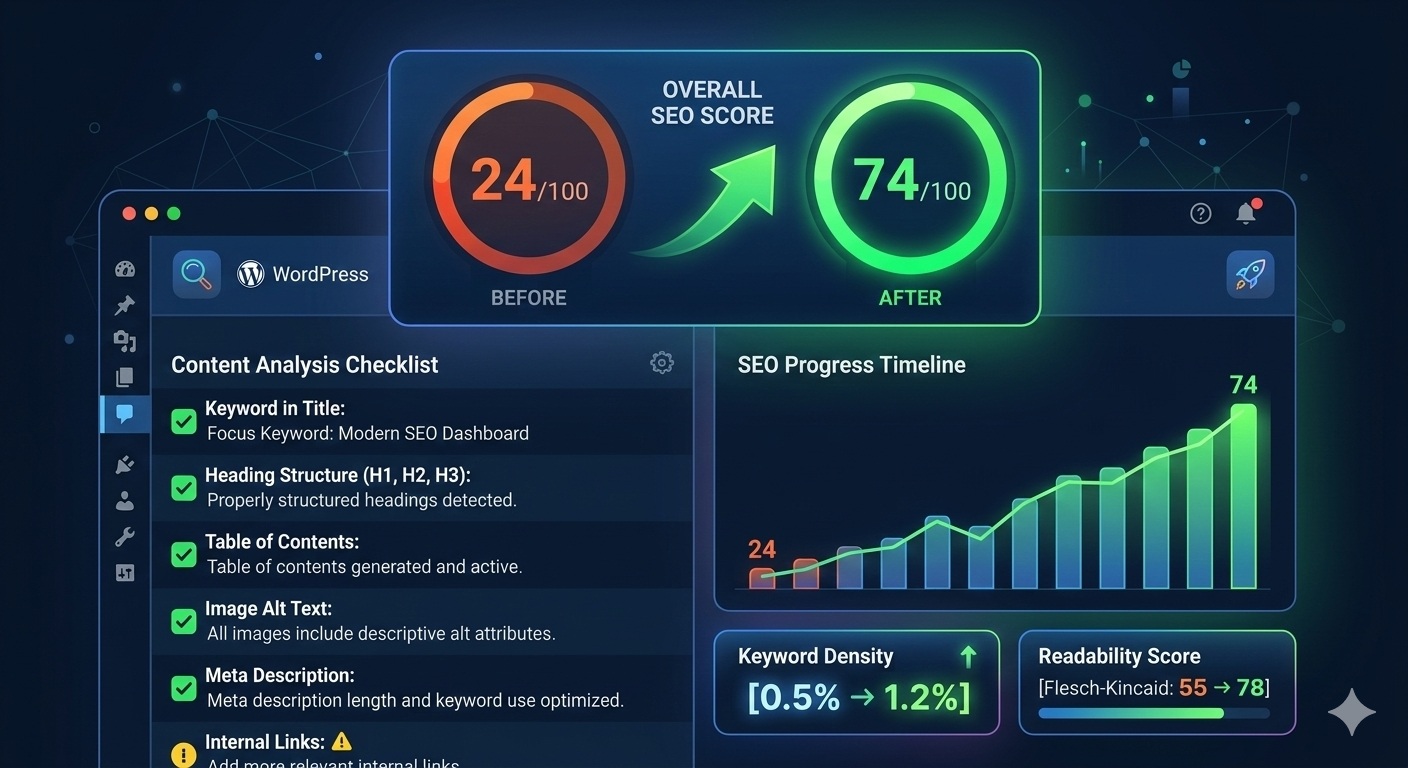
TL;DR: The GEO Lab improved a WordPress post from 24/100 to 74/100 on Rank Math by aligning focus keywords with existing content rather than rewriting content to match keywords. The largest single gain (+38 points) came from keyword selection alone. Bulk optimization of 26 pages revealed five Rank Math pitfalls including schema conflicts, TOC block errors, and the critical importance of keyword placement in the first paragraph.
This Rank Math optimization case study documents how The GEO Lab improved a WordPress post from 24/100 to 74/100 using Rank Math SEO. The key insight: aligning your focus keyword with existing content delivers bigger gains than forcing content to match arbitrary keywords. This guide covers the optimization process and common Rank Math pitfalls discovered during bulk optimization of 26 pages.
The Starting Point: 24/100 Rank Math Score
I ran the Rank Math analysis on our PageSpeed Quad-100 Case Study — a detailed 3,400-word technical article documenting how we achieved a perfect Google PageSpeed score on WordPress mobile. Despite being well-written and comprehensive, Rank Math gave it only 24/100.
The original focus keyword was “PageSpeed WordPress mobile” — a phrase chosen for search intent but poorly matched to the actual content structure.
Diagnosing the Rank Math Problem: Why the Score Was Low
Rank Math uses a checklist-based scoring system that looks for exact keyword phrase matches in specific locations. I found these failures when I ran the diagnostic:
RankMath’s technical layer is one component of GEO Stack crawlability requirements — a sub-60 score indicates structural failures that affect both traditional search indexing and AI retrieval, often for the same underlying reasons.
| Check | Status | Issue |
|---|---|---|
| Keyword in URL | ❌ Fail | URL had “pagespeed” and “wordpress” but not “mobile” |
| Keyword in first paragraph | ❌ Fail | First paragraph was a metadata line, not keyword-rich |
| Keyword in H2 heading | ❌ Fail | No H2 contained the exact phrase “PageSpeed WordPress mobile” |
| Keyword density | ⚠️ Low | Exact phrase appeared only once in 3,400 words |
The core insight: Rank Math penalizes misaligned focus keywords. A well-written article can score poorly if the chosen keyword does not match the content structure.
Going deeper? The GEO Workbook is a 30-day action plan that turns the GEO Stack framework into daily tasks — one section per day, measurable progress each week.
Rank Math Optimization Round 1: Focus Keyword Selection
Instead of rewriting content to match an arbitrary keyword, we changed the keyword to match existing content. The new focus keywords were:
- pagespeed optimization (appears naturally in the content)
- wordpress performance (matches the article topic)
- quad 100 score (unique phrase from the article)
This single change moved the score from 24 to 62 — a 38-point improvement with zero content edits.
Rank Math Optimization Round 2: Content Structure
With better-aligned keywords, we made targeted content edits:
- Added intro paragraph — Inserted a keyword-rich paragraph immediately after the featured image: “This PageSpeed optimization case study documents how The GEO Lab achieved a perfect quad-100 score…”
- Modified H2 headings — Changed “What This GEO Case Study Documents” to “What This PageSpeed Optimization Case Study Documents”
- Second H2 edit — Changed “What Were the Baseline Measurements Before Optimisation?” to “Baseline Measurements: WordPress Performance Before Optimization”
These edits increased keyword occurrences from 1 to 5 and placed keywords in the locations Rank Math checks. Score: 62 → 70.
Rank Math Optimization Round 3: Table of Contents
Rank Math rewards long-form content that includes a Table of Contents. We added a TOC block listing all H2 sections. Score: 70 → 72.
The broader GEO compliance audit — which includes RankMath score as one of 71 checks — is documented in the GEO audit system post, covering schema validation, entity integrity, and JSON-LD graph checks that the RankMath plugin does not verify.
The smaller improvement here indicates TOC is worth fewer points than keyword placement, but still contributes to the overall score.
Rank Math Optimization Round 4: Image Alt Text
The featured image alt text described the image but lacked keywords. We changed:
Before: “Google PageSpeed Insights dashboard showing four perfect scores of 100…”
After: “PageSpeed optimization results showing quad-100 score on WordPress…”
Final score: 72 → 74.
Final Rank Math SEO Score Results: 24 to 74
| Optimization | Score Before | Score After | Improvement |
|---|---|---|---|
| Starting point | — | 24 | — |
| Better keyword selection | 24 | 62 | +38 |
| Content structure edits | 62 | 70 | +8 |
| Table of Contents | 70 | 72 | +2 |
| Image alt text | 72 | 74 | +2 |
Total improvement: +50 points with minimal content changes. The largest gain came from aligning the focus keyword with existing content rather than forcing content to match a misaligned keyword.
Rank Math Bulk Optimization Pitfalls: 26 Pages on WordPress
After optimizing the PageSpeed case study, we applied similar improvements across all 26 pages and posts on The GEO Lab. This bulk optimization revealed several Rank Math pitfalls that are not documented in official guides.
Pitfall 1: Schema Shows “Off” After Setting via WP-CLI
When we set rank_math_rich_snippet to “article” via WP-CLI for all pages, the Rank Math dashboard displayed “Schema: Off” — the opposite of what we intended.
The cause: Rank Math expects schema settings to come from global defaults (Settings → Titles & Meta) unless explicitly overridden in the post editor. Setting the meta field programmatically creates a mismatch that Rank Math interprets as “Off”.
The fix: Delete the rank_math_rich_snippet meta field entirely. Let Rank Math use global defaults. Pages will automatically inherit “Article” schema from the global post type settings.
Pitfall 2: TOC Block Causes JavaScript Errors
Adding Rank Math TOC blocks via WP-CLI or database import caused this error in the WordPress editor:
TypeError: Cannot read properties of undefined (reading length)
at save (rank-math/blocks/toc/assets/js/index.js)
The cause: The Rank Math TOC block requires a properly formatted headings array in its block attributes. When added programmatically with only {"title":"Table of Contents"}, the block crashes because it cannot iterate over undefined headings.
The fix: Use simple HTML instead of the Rank Math TOC block when adding TOC programmatically:
<!-- wp:html -->
<div class="toc-box">
  <strong>Table of Contents</strong>
  <ul>
    <li><a href="#section-1">Section 1</a></li>
    <li><a href="#section-2">Section 2</a></li>
  </ul>
</div>
<!-- /wp:html -->
Pitfall 3: SEO Score Shows “N/A” in Dashboard
After bulk-updating posts, the Rank Math dashboard showed “N/A” for SEO scores on all pages.
The cause: Rank Math calculates SEO scores client-side using JavaScript when you open a post in the editor. There is no server-side calculation. WP-CLI cannot trigger score recalculation.
The fix: Open each post in the WordPress editor briefly. Rank Math will analyze the content and cache the score. There is no bulk alternative — this is by design.
Pitfall 4: Inline JSON-LD Causes PHP Critical Error
Adding structured data directly in post content using <script type="application/ld+json"> caused a critical PHP error when previewing posts:
TypeError: Cannot access offset of type string on string
in rank-math/includes/modules/schema/class-frontend.php
The cause: Rank Math parses post content looking for schema markup. When it encounters inline JSON-LD, it attempts to merge it with its own generated schema. The conflict between the two data structures causes a type error.
The fix: Remove all inline JSON-LD from post content. Let Rank Math handle schema generation entirely through its built-in schema settings. If you need custom schema, use Rank Math’s “Custom Schema” feature in the post editor rather than embedding JSON-LD directly in content.
Pitfall 5: First Paragraph Is Metadata, Not Content
After fixing the previous issues, the score remained stuck at 27/100. The cause: the first <p> tag in the post was a metadata line:
Published: 13 March 2026 · Last updated: 6 March 2026 · Reading time: 8 minutesThe cause: Rank Math checks if your focus keyword appears in the “first paragraph” — but it defines this as the first <p> tag in the content. A styled metadata line with zero keywords fails this check silently.
The fix: Move your keyword-rich intro paragraph before any metadata lines. The first <p> tag must contain your focus keywords. This single change moved the score from 27/100 to 70/100.
Key Takeaways for Rank Math SEO Optimization
Based on this case study and bulk optimization of 26 pages, here are the most effective Rank Math optimization strategies:
- Choose keywords that match your content — Do not force content to match keywords. Find phrases that already appear naturally.
- Keyword placement matters more than density — Keywords in title, first paragraph, and H2 headings carry more weight than repetition throughout.
- Add a Table of Contents to long content — Any post over 1,500 words benefits from a TOC. Use simple HTML if adding programmatically.
- Include keywords in image alt text — Natural keyword inclusion in alt text adds a few points.
- Do not chase perfect scores — 74/100 is solid. Pushing to 90+ often requires keyword stuffing that hurts readability.
- Let Rank Math use global defaults — Do not set schema or rich snippet meta fields programmatically. Let global settings handle it.
- Avoid Rank Math blocks in programmatic content — Use simple HTML for TOC, FAQ, and other structured content when adding via WP-CLI or imports.
Rank Math scores are a useful checklist, not a ranking factor. Google does not see your Rank Math score. Focus on creating valuable content first, then optimize the on-page elements Rank Math checks.
Frequently Asked Questions
What is a good Rank Math SEO score?
A Rank Math score of 70-80 indicates well-optimized content. Scores above 80 often require keyword density that hurts readability. Google does not see your Rank Math score — it is a checklist-based proxy, not a ranking factor. Focus on natural keyword placement in the title, first paragraph, and H2 headings rather than chasing a perfect 100.
Can you improve Rank Math scores without changing content?
Rank Math scores can improve without content changes. In this case study, changing the focus keyword from a misaligned phrase to one matching existing content improved the score from 24 to 62 — a 38-point gain with zero content edits. Rank Math penalizes keyword misalignment, so selecting the right focus keyword is often the highest-impact intervention.
Why does Rank Math show “Schema: Off” after setting via WP-CLI?
Rank Math expects schema settings from global defaults (Settings → Titles & Meta) unless explicitly overridden in the editor. Setting rank_math_rich_snippet programmatically creates a mismatch. The fix is to delete the meta field entirely and let Rank Math inherit from global post type settings.
Does Rank Math score affect Google rankings?
Rank Math scores do not affect Google rankings. Google has no access to your Rank Math score. The score is a local checklist that measures keyword placement, content structure, and on-page signals. These elements can indirectly improve SEO, but the score itself is not a ranking signal. Use it as a diagnostic tool, not a target metric.
How does Rank Math optimization relate to GEO?
Rank Math optimizes for traditional SEO signals — keyword placement, meta data, and schema. Generative Engine Optimisation (GEO) addresses a different problem: whether content is retrieved and cited by AI systems. Both are valuable. Rank Math helps with indexation and ranking; GEO helps with AI citation and extraction. They operate at different layers of The GEO Stack.
Sources
- Rank Math. (2026). How to Score 100/100 in Rank Math SEO Tests.
- The GEO Lab. (2026). PageSpeed Quad-100 WordPress Case Study.
- The GEO Lab. (2026). The GEO Stack Framework.
Have questions about this topic? Contact The GEO Lab · Return to homepage